Collaboration is an act of co-working to obtain a certain result or outcome. It can be anything from baking your favorite pie to a new product launch. As easy as it may sound, collaboration has not been that easy for individuals, teams, and businesses, and it is nobody’s fault either.
The ever-changing digital landscape, umpteen social apps, devices & platforms have spoiled us for choice. The wild digital freedom can inhibit collaboration if not used wisely.
Effective team collaboration is crucial for the success of any organization, whether it’s a small startup or a large corporation. Teams want to be able to contact one another to highlight and discuss the shared work that’s taking place within your product. Enabling the ability to add people to projects will help with this collaboration, as well as showing which users are working in which spaces and allowing users to comment and suggest. With the rise of remote work and distributed teams, it has become more important than ever to have the right tools in place to facilitate collaboration and communication between team members. In this blog post, we will explore some of the best online team collaboration tools available today.
Importance of Team Collaboration Tools:
The need for a simplified and single collaboration platform is essential as it is a place where you can:
- Get all your team members together (no matter how dispersed they are)
- Easily exchange and brainstorm ideas
- Real-time review of progress
- Ensure everyone understands the same thing. Understanding True Project Requirements!
- Everyone does exactly what is required
Best Online Team Collaboration Tools:
Team collaboration tools can help teams to communicate more efficiently, collaborate on projects, and stay organized, no matter where they are located. Whether you are looking for a messaging platform, a project management tool, or a video conferencing solution, there is a tool out there that can meet your needs.
So, let’s see some of the best tools that are available to boost team collaboration:
| Sr. No. | Tool | Pricing | Best Used For |
|---|---|---|---|
| 1 | Asana | Free plan, Paid from $10.99/mo | Project & task management |
| 2 | Calendly | Free plan, Paid from $8/mo | Scheduling meetings & appointments |
| 3 | Confluence | Free plan, Paid from $5.75/mo | Team documentation & knowledge base |
| 4 | InVision | Free plan, Paid from $7.95/mo | Design collaboration & prototyping |
| 5 | Google Docs | Free | Collaborative document editing |
| 6 | Zoom | Free plan, Paid from $14.99/mo | Video conferencing & webinars |
| 7 | Trello | Free plan, Paid from $5/mo | Visual task & project tracking (Kanban) |
| 8 | Slack | Free plan, Paid from $8.75/mo | Team messaging & real-time collaboration |
1. Asana
| Website | Asana.com |
|---|---|
| Founded In | 2008 |
| Headquarters | San Francisco |
| Rating | 4.5 out of 5 |
| Free Trial | Available |

Asana was founded in 2008 by Facebook co-founder Dustin Moskovitz and former Google and Facebook engineer Justin Rosenstein. Asana is a highly intuitive project management SaaS that helps teams track and assign tasks, visualize timelines, and report on productivity.
Evidence of Asana’s effectiveness can be found in its explosive growth. Calculated of January 2021, Asana had more than 1.5 million paid users, with a total user count of 30 million users. Asana has joined the list of unicorns with its most recent revenue calculated to be approximately $227 million as of 2021.
Best of all, the tool makes it easy to visualize the progress being made on a diverse array of projects and individual tasks across the organization.
Features of Asana
- Boards feature that always prioritizes the most important task by providing an overview of all tasks that need to be completed.
- You can use the calendar view to plan for the whole week by simply assigning a task on each day.
- It helps to put your workflow on autopilot to save time in creating tasks.
- The task cannot be marked as complete until its dependent tasks are completed. To use this feature, you need to create task dependencies.
- Provides a powerful dashboard that gives insights into the progress of the task.
Pros:
- 200+ integration options
- The free plan is available
- Workflow builder to create a workflow
- Templates are available
- Live chat support
- Simple user interface
Cons:
- Limited templates
- Copy and paste functionality doesn’t work properly
Pricing:
| Plan | Yearly Price | Monthly Price |
|---|---|---|
| Basic | $0/month | $0/month |
| Premium | $10.99/month | $13.49/month |
| Business | $24.99/month | $30.49/month |
Try Asana For Free
2. Calendly
| Website | Calendly.com |
|---|---|
| Founded In | 2013 |
| Headquarters | Atlanta |
| Rating | 4.7 out of 5 |
| Free Trial | Available |

One of the challenges of having offices and remote teams across the globe is scheduling convenient times for virtual meetings and chats. Calendly eliminates the back-and-forth often associated with scheduling.
With Calendly, each member of your team gets a dedicated URL for a calendar showing his or her availability and allowing other team members to request an appointment at a suitable time.
Team members can also share their availability with clients through Calendly, either through their URL or by embedding their calendar on a website. For Asana users, Zapier offers extensive integrations with Calendly, and Calendly also syncs with all of the popular calendar apps, eliminating both unnecessary data entry and the possibility of double-booking.
Features of Calendly
- You can set your availability; it only allows users to book meetings on the date and time set by you.
- It automatically converts time zones and makes it easy to schedule meetings with people in different time zones.
- You can customize the look of the Calendly landing page with your own brand logo.
- It sends email reminders to attendees so that they don’t miss the meeting.
- The embed feature of Calendly allows you to embed your appointment booking link on your website.
- It allows both one-on-one and group meetings based on your requirements.
Pros:
- Seamless integration with other calendars
- Helps to ask questions of the invitees
- Stripe and PayPal integration to receive payment
- A browser extension is available
- Easy-to-use
- The free plan is available
- Video tutorials are available to help you learn the tool
Cons:
- Some users experienced that the app crashes occasionally
Pricing:
| Plan | Yearly Price (Save 20%) | Monthly Price |
|---|---|---|
| Basic | $0/month | $0/month |
| Essentials | $8/month | $10/month |
| Professional | $12/month | $15/month |
| Teams | $16/month | $20/month |
| Enterprise | Custom Price | Custom Price |
 Ashwini
3. Confluence
| Website | www.atlassian.com/software/confluence |
|---|---|
| Founded In | 2013 |
| Headquarters | Pittsburgh |
| Rating | 4.5 out of 5 |
| Free Trial | Available |

Atlassian’s Confluence offers much of the functionality of Asana (for project management) and Google Docs (collaboration on text documents), but it is most useful as a knowledge base. For example, Standard Operating Procedures (SOPs), employee reference forms, and client forms all live in Atlassian’s Confluence.
Confluence also acts as an effective human resources portal. Employees can request time off, perform monthly self-evaluations, and complete many other repeatable processes that an admin defines as being within the Confluence platform.
Features of Confluence
- Administrators can set permissions and restrictions on who can view, edit, or create content.
- Seamlessly integrates with a wide range of other tools and services, such as Jira, Trello, Slack, and Microsoft Teams.
- It provides a flexible and customizable structure for organizing content, pages, spaces, and labels.
- Text editor to format the content and add links, tables, and macros.
Pros:
- The free plan is available
- Knowledge base articles to learn
- Ready-to-use templates
- Wide range of integration
- Provides seamless collaboration
Cons:
- Steep learning curve
- Limited integration with Office 365
Pricing:
| Plan | Yearly Price (Save 20%) | Monthly Price |
|---|---|---|
| Free | $0/month | $0/month |
| Standard | $580/year | $57.50/month |
| Premium | $1,100/year | $110/month |
| Enterprise | Custom Price | Custom Price |
4. InVision
| Website | www.invisionapp.com |
|---|---|
| Founded In | 2011 |
| Headquarters | New York City |
| Rating | 4.6 out of 5 |
| Free Trial | Available |

For digital entrepreneurs, user experience (UX) design is almost always of vital concern. But design is notoriously difficult to talk about, particularly if you have multiple stakeholders involved in giving feedback, and they’re not in the same room.
InVision is a SaaS app used by companies such as Amazon, Airbnb, and Netflix to build interactive and responsive prototypes without writing a single line of code. InVision’s tools are designed to be intuitive even for users without a design background.
Users can mark up design drafts within the InVision app or utilize its integrations with Slack and other messaging tools to easily share feedback directly onto the design draft itself, making it much easier to associate comments with specific UX elements. As Aaron Walter, director of UX at MailChimp, says in InVision’s intro clip, when it comes to UX design, “InVision is a faster way to certainty.”
Features of InVision
- Designers can export their designs to developers in a format that can be easily implemented in code.
- It helps to create and manage design systems that ensure consistency across the whole design.
- Real-time collaboration with teammates and establishing a healthy workflow using comments and feedback.
Pros:
- The free forever plan is available
- Integration with Figma, Adobe XD, and Asana
- Single-sign on
- Multi-factor authentication
- Knowledge base article
- Free templates to use in projects
Cons:
- Limited features compared to Figjam
- Prototyping can be better
Pricing:
| Plan | Yearly Price (Save 20%) | Monthly Price |
|---|---|---|
| Free | $0/month | $0/month |
| Pro | $4/month | $4.95/month |
| Enterprise | Custom Price | Custom Price |
Niku Mandal
5. Google Docs
| Website | Docs.google.com |
|---|---|
| Founded In | 2005 |
| Headquarters | California |
| Rating | 4.7 out of 5 |
| Free Trial | Available |

From its humble beginnings, Google Docs has evolved into a full-fledged word processor worthy of favorable comparison with Microsoft Word, long the industry standard for content creators.
One of the primary strengths of Docs is just how much it facilitates collaboration. The father of Google Docs, Sam Schillace, identified collaboration as “the crown jewel of hard problems.” This is particularly true when multiple people need to work together on a document.
Traditionally, the collaboration required sending a Word document back and forth via email to multiple recipients. Keeping track of which document was the most current and combining comments and revisions from various contributors could quickly turn into a torturous process.
Docs’ version history function eliminates the fear of saving changes. You can quickly and easily revert to any previous version of the document. Additionally, the “comment” function in Google Docs makes it easy to communicate with colleagues directly within the document. Docs also integrate with Slack, so you can receive a notification in your Slack workspace any time a comment is made or resolved within the doc.
Features of Google Docs
- It can be accessed on mobile devices via the Google Docs app for easy editing and collaboration on the go.
- Google Drive storage stores all the data of documents in the cloud which is accessible from anywhere.
- Multiple users can work on the same document in real-time and comment if some changes are required by other team members.
Pros:
- Free to use
- The mobile app is available
- Seamless sign-in using a Google account
- Google Drive storage space
- A variety of templates are available
- Add-ons are available to enhance the functionality
Cons:
- Difficult to get customer support
Pricing:
| Plan | Monthly Price |
|---|---|
| Basic | $6.00 per user per month |
| Business | $12.00 per user per month |
| Enterprise | $25.00 per user per month |
6. Zoom
| Website | Zoom.us |
|---|---|
| Founded In | 2011 |
| Headquarters | California |
| Rating | 4.6 out of 5 |
| Free Trial | Free Subscription |

Sometimes there’s just no substitute for meeting face to face, even if your team is distributed around the globe. Zoom is a first-in-class video conferencing SaaS app that makes it effortless to host meetings with your team, no matter where they’re located. It also makes in-person presentations location-independent, with its extensive webinar functionality.
Video conferencing can be invaluable for reinforcing company culture. Putting faces to names and being able to do this every week helps build relationships and encourages teamwork.
The Zoom platform integrates various features such as cloud video conferencing, online meetings, wireless content sharing, and team chatting into one unified system. Zoom allows users to seamlessly connect multiple conference rooms, include remote participants, and facilitate in-person meetings with just one touch.
Features of Zoom
- The host of the meeting can mute participants, remove participants, and control screen sharing.
- It has a chat feature that empowers users to send messages to other participants during a meeting without interrupting the speaker.
- You can create polls for getting feedback or making decisions during a meeting.
- Participants have the option to create a virtual background that helps to hide the messy background in video calls.
Pros:
- Up to 1000 participants can join a single meeting
- The free plan is available
- Easy to use
- Marketing tools to nurture contacts
Cons:
- The free plan allows a meeting for only 40 minutes
Pricing:
| Plan | Yearly Price |
|---|---|
| Basic | Free |
| Pro | $149.90/year/user |
| Business | $199.90/year/user |
| Enterprise | Custom Price |
7. Trello
| Website | Trello.com |
|---|---|
| Founded In | 2011 |
| Headquarters | New York |
| Rating | 4.4 out of 5 |
| Free Trial | Available |
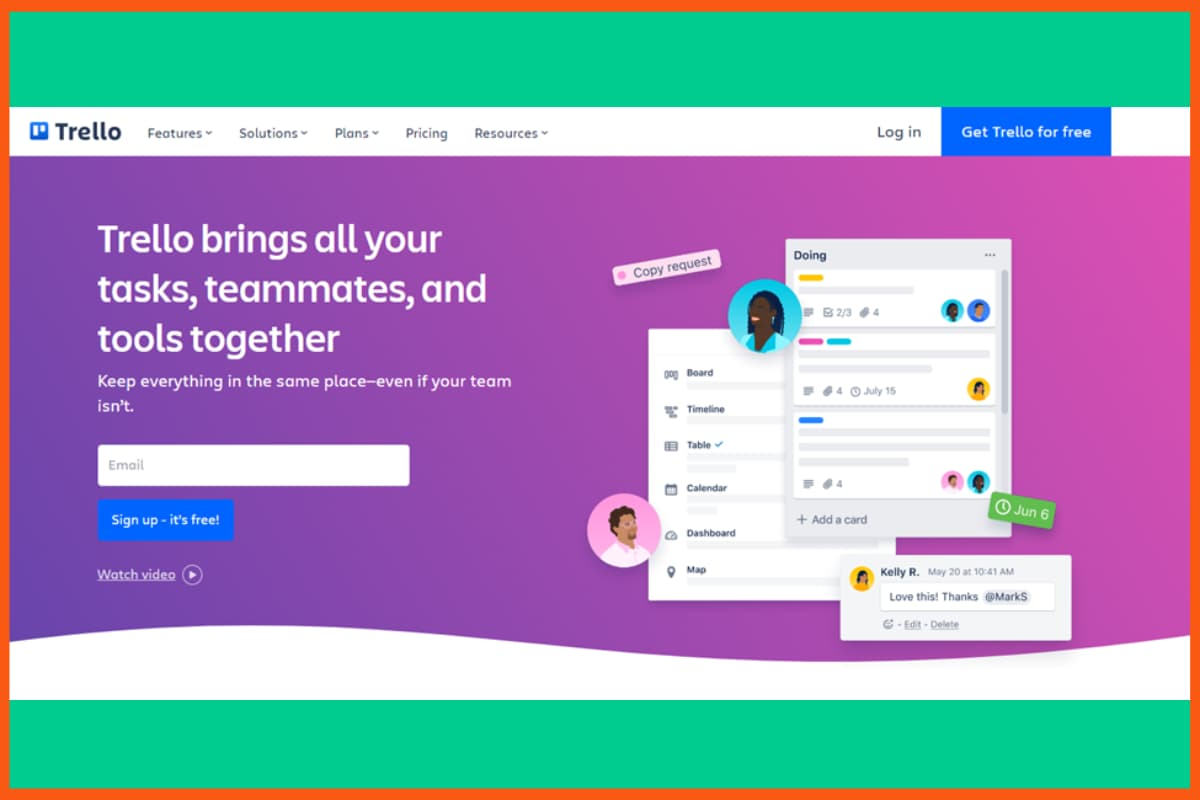
Trello is a simple, flexible tool for organizing tasks and collaborating with your team. Its clean design makes it easy to use, even for beginners. You can customize boards, track progress, and connect with apps like Slack, Evernote, and Google Drive.
Features of Trello
- Automates tasks, schedules work, and sends deadline reminders.
- Switch between Board, Timeline, Calendar, Map, and Dashboard views.
- Connect with popular apps for smoother workflows.
Pros:
- Easy to use
- Highly customizable
- Strong app integrations
Cons:
- Limited features in free plan
- Can get cluttered with many cards
- Basic reporting tools
Pricing:
| Plan | Yearly Price |
|---|---|
| Free | $0 |
| Standard | $60/year/user |
| Premium | $120/year/user |
| Enterprise | Custom Pricing |
8. Slack
| Website | Slack.com |
|---|---|
| Founded In | 2013 |
| Headquarters | San Francisco |
| Rating | 4.6 out of 5 |
| Free Trial | Available |
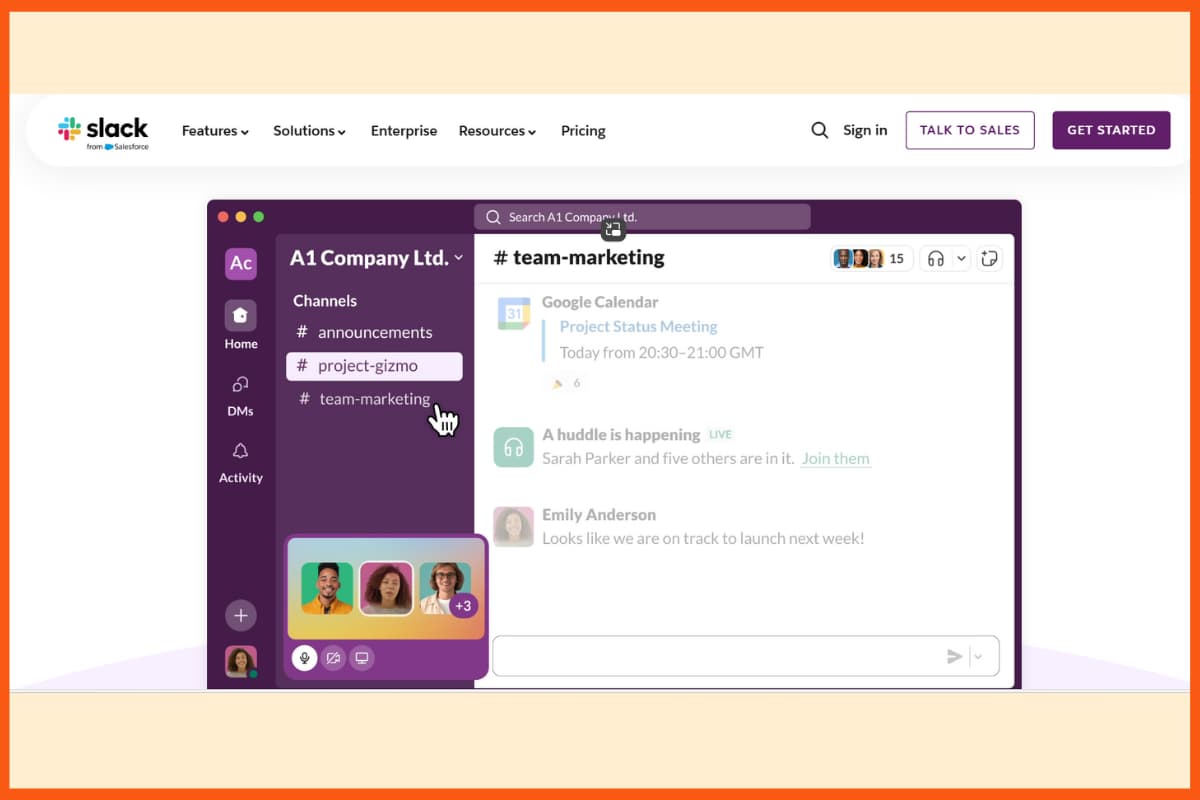
Slack is a popular platform that gives teams one place to chat, share ideas, and stay connected in real time. It boosts productivity through instant messaging, voice calls, and organized channels for different topics or teams.
Features of Slack:
- Built-in voice, video, and screen sharing for quick updates and collaboration.
- Works smoothly with tools like Google Drive, Trello, Jira, and HubSpot.
- Public or private spaces to organize discussions and keep work focused.
Pros:
- Easy real-time communication
- Many app integrations
- Organized channels for topics
- Supports file sharing and calls
Cons:
- Can be distracting with too many messages
- Limited features in free plan
- Search history cap in free plan
Pricing:
| Plan | Yearly Price (per user) |
|---|---|
| Free | $0 |
| Pro | $7.25/month ($87/year) |
| Business+ | $12.50/month ($150/year) |
| Enterprise Grid | Custom Pricing |
Conclusion
Successful collaboration is an absolute necessity for any business as it grows. The right online team collaboration tools can make a huge difference in how teams communicate and work together. We have explored some of the best online team collaboration tools available today, including Asana, Calendly, Confluence, InVision, and more. Hope now you will have a better understanding of the different online team collaboration tools available, and be able to choose the right one to help your team work more effectively and efficiently.
FAQs
What are online team collaboration tools?
Online team collaboration tools are software applications that help teams to communicate, collaborate, and work together on projects or tasks. These tools can include messaging platforms, project management tools, video conferencing solutions, and more.
Why use team collaboration tools?
There are several advantages attached to the use of team collaboration tools, some of them can be counted are transparency, effective communication, increased effectiveness of an employee, etc. These tools can be especially helpful for distributed teams or remote workers who may not be able to collaborate in person.
Which are some of the best free online collaboration tools?
Some of the best collaborative tools are Google Docs, Confluence, Zoom, etc.
How can collaboration tools affect teamwork?
Collaboration tools can improve teamwork by facilitating communication, coordination, and productivity. They provide a central platform for messaging, video conferencing, and file sharing, allowing teams to work together more efficiently.
What should I look for in an online team collaboration tool?
When choosing an online team collaboration tool, you should consider factors such as ease of use, the ability to integrate with other tools, security and privacy features, and the specific needs of your team.
How can I ensure my team is using the collaboration tool effectively?
To ensure your team is using the collaboration tool effectively, you should provide training and support to help team members understand how to use the tool. You should also set clear expectations and guidelines for how the tool should be used, and encourage open communication and feedback from team members.


