Image or photo editing refers to altering and Re-touching an image which can be digital photographs, traditional photo-chemical ones or can be illustrations. Image editing is a crucial part of photography before releasing the final result.
The image editing can be done by software, by hand for hand-images or can be done by 3D modellers. The images are edited to make them amazing and wonderful and more authentic. The image editing takes include airbrushing, colour correction, photo manipulating and to remove unwanted flaws or objects from the image.
VSCO is a very popular and the best photo editing app, it is basically a mobile app for iOS and Android devices. It is commonly used among photographers as it allows with advanced editing features and also tools to include white balance, shadows, effects, etc and can be very useful for Instagram or Facebook or any other social media posts. The app comes with a free version that has the basic features and for more advanced features one has to pay for the subscription price which is $ 19.99.
Adobe Lightroom
Adobe Lightroom – best app for photo editing for business
Adobe Lightroom is another popular app for image editing by Adobe. It is known to be great software when it comes to photo editing and makes it share-worthy. The app is used by budding photographers to top fashion photographers. The features are exceptionally amazing to be used and the features include face detection for photo organization, bears multiple devices and sync with multiple devices. It also has to fix and blurring tools to make changes in the picture and has brush and gradient adjustments. It also comes with pre-sets and professional fillers and effects, which can be used to enhance the features of the image.
Adobe Photoshop
Adobe Photoshop – best app for photo editing for business
Adobe is known for providing the best apps for photo and video editing and one such app is Adobe Photoshop which is a trusted app for artists, designers, photographers, etc. It has some brilliant features like touch-up and re-touch features, numerous amounts of filters and bushes, multi-layer editing, pro-editing tools, variable fonts, colour, and luminance range masking, has a quick share menu, etc. It has a score of 9.6 out of 10 and is a part of Adobe Creative Cloud Service. It also has a free trial and the single app (individual ) has a subscription of $29.99/month and the single app (for business/teams) is $29.99 /month/license.
ON1 Photo Raw – best app for photo editing for business
A unique name in the system of apps, ON1 Photo Raw is an app which is free to use and is easy to download and install. The app has more than 170 effects with photo editing, brush, marketing tool, and filters, which makes it a very popular app to use by the beginners especially.
Facetune
Facetune – best app for photo editing for business
Facetune is one of the common photo editing apps, it’s mostly used for enhancing and retouching photos and can be installed on both iOS and Android devices. The features includes teeth whitening, removing blemishes, acne, and pimples, contouring the face and sharpening the features of a face, correct the bad lighting and the users get a chance to use and choose among a lot of filters and lightning, textures, contrast, frame options, and a lot of other features.
The app was launched in November 1, 2016 and has been used by commoners as well as professionals. It also can change the background of the photo, allows live photo editing and adds natural makeup, and stickers.
Enlight Photofox
Enlight Photofox – best app for photo editing for business
Enlight is more appropriate photo editing software which includes adjustments, localized image editing, and masking features. It has wide ranges of features includes light leaks, textures, frames, borders and collage layouts. It also allows us to draw, write and doodle on the images which have been selected by the user and can also add texts, borders, frames in it. The app is only available for iOS users making it a disadvantage for the Android users.
PicsArt Photo Studio
PicsArt – top 10 photo editing app
PicsArt Photo Studio is a very common and household app which is used by almost most of the 21st-century people and those who love their social media. It is available for both iOS and Android. The app can be used for putting stickers, fonts, customized texts, and also allows the create collages. There is also a video creation feature that allows creating videos with audio, either from the app’s store or personalized tunes. It has both the free and paid version. The free versions have the basic features and the paid versions have more advanced features.
Colorcinch
Colorcrinch – top 10 photo editing app
One of the best image editing tools, Colorcinch is an intuitive web-based photo editor that lets you enjoy the beauty of AI-powered photo effects and editing tools. You can turn any photo into a cartoon, painting, sketch, and more in just a snap! You can fine-tune photo details, make their colors pop, and use one-click blend modes to give your photos a genuinely unique style and feel.
The tool comes with a vast library of filters & presets, templated masks, overlays, and frames that you can play around with. When everything’s perfect, you can export your creations as JPG, PNG, or PDF and achieve a print quality of up to 400 DPI.
Colorcinch- top photo editing app
Fotor Photo Editor
Fotor Photo Editor – top 10 photo editing app
Fotor Photo Editor is very smooth running app for image editing. It has its own set of cool features, tools, and textures for image enhancing. There is a wide range of filters and effects for image editing. The app is free to use but contains advertisements in-between.
Snapseed
Snapseed – top 10 photo editing app
Snapseed was produced by Nik Software which is currently owned by Google, it is an app for image editing and available for both iOS and Android users. It is one of the best apps for image editing. Snapseed was developed in June 2011. The features includes effects and filters including Drama, Grunge, Vintage, etc for giving classic effects to the images. The raw images can be also exported and can be edited using the features of the app. The app allows direct sharing options of pictures in social media including Instagram, Facebook, and other media sites. It also allows to clean -up the flaws of the photos.
Pixlr is the best photo editing software as it comes with a free version as well as a paid version. It is useful for its wide range of blemish removal and cosmetic adjustments with over 2 million combinations of free effects, overlays, and filters. Pixlr also can be used for making selfies more beautiful and more social media-worthy using its auto-fix and double exposure features.
FAQs
Which is the best app for photo editing?
VSCO
Adobe Lightroom
Adobe Photoshop
ON1 Photo Raw
Facetune
Enlight Photofox
PicsArt Photo Studio
Fotor Photo Editor
Snapseed
Pixlr
What is the best editing app for free?
Vizmato is the best apps to make edits.
Is Adobe Premiere Pro free?
You can download Premiere Pro for free, and trial it for seven days to find out if you like it or not. Premiere Pro is one of the paid-for video editing program, but if you go direct to Adobe, you can get the week-long version that will give you full access to the incredibly powerful software.
With time, businesses have changed their outlook while hiring people. Nowadays companies are taking interest in freelancers apart from permanent employees. During the pandemic era, when people were left jobless, they opted for the second-best option, Freelancing.
In freelancing, one is not permanently hired by a company; here they work as an independent contractor for a particular project provided by the company. Somehow, the second-best option has now turned into the best option for most of them. Businesses took this opportunity and started turning it into their favor by hiring freelancers for most of the work.
Now, the benefits of this new kind of employment have attracted a world. In the point of view of a business, they are getting their work done by a person who specializes in the preferred domain and in a much lesser price. The pay-per-project factor is what encourages the businesses as well.
When you hire freelancers, managing them can be a little difficult, as they work from remote places and face-to-face meeting them is not possible.
Therefore, while managing the team, some tools are needed to ensure hassle-free and smooth work. This article will talk about the tools that have taken upon themselves in managing freelancers but before that let’s talk about the challenges that are faced during the management of freelancers.
There exist numerous benefits of working with freelancers, but the obstacles are there as well. Some of the most common of them are:
Communication
Communication is a big factor; a project’s success huge depends on the communication process between the client and the freelancer. Sometimes miscommunication while video conferencing or non-verbal ways can lead to a severe conclusion. Tools like Google Docs can be a little trickier while using, to provide detail of the project to the freelancer.
Time Management
Time Management is another issue, if deadlines are not met by the workers, it can rig the entire working system which can even lead to the cancellation of the project.
Management of the project
Management of the project can be a little tricky; the employer needs to be cautious. They need to update the freelancers if there are any changes in the project and cater to the needs of the freelancers as soon as possible so that they can deliver the best result possible.
Managing the independent contractors
Managing the independent contractors can also be an issue, if that person is not giving their best or creating problems for the required project, it may cause a hindrance for the company.
Tools to Manage Freelancers
These entire problems can be resolved if one just uses the tools then the collaboration between the client and the freelancer can be a success. All the below tools help in managing the freelances as if they are working on-site instead of remote.
Trello
Trello Website
This tool helps the client in tracking the progress of the work done by the freelancer. The tools help in organizing all the work in a single board that shows who is working on what and what the progress of that work is. It is called a visual collaboration tool, where comments can be given, attachments can be uploaded that are needed for the project.
Apart from that, due dates can also be assigned. The projects details are visible to those people who are invited by the employer, so leaking sensitive information can be avoided.
Trello Pricing
Trello Pricing
Alternative Apps- Asana, Wrike, ClickUp, Jira
Slack
Slack Website
Communication is important in any kind of job, it wouldn’t be wrong to say that it is the key to managing the freelancers as well. Communicating through email, text messages can take a lot of time and may result in delayed work.
So, Slack here solves that problem. It is an all-in-one communication app; it allows text messages, voice calling, and video calling as well. Through this, communication becomes easier between freelance employers and the independent project workers.
Slack Pricing
Slack Pricing
Alternative Apps- RocketChat, Discord, Mattermost, Flock, Ryver, Microsoft Teams, Google Chat
People are mostly interested to work as a freelancer because it provides the flexibility of time. One can work when one wants to. Sometimes this can create a struggle for the employer to keep the workers on time.
ResourceGuru makes the job of employer a lot easier; it provides the employer with the availability list of the freelancers. They provide calendar features and helps in scheduling the work of the freelancers according to their time eliminating the struggle of time-consuming.
ResourceGuru Pricing
ResourceGuru Pricing
Alternative Apps- Tempus Resource, Mavenlink, Forecast, Journyx, LiquidPlanner
15Five
15five Website
The dispute often arises, when queries are not solved through proper communication. Feedback from the workers is needed for the betterment of the project.
15Five is an app that helps in getting feedback from employees. This also provides the company to answer the queries that arise in the feedback provided by the employees. Therefore, it solves any issues that can create a problem because of not communicating properly, for the project.
15five Pricing
15five Pricing
Alternative Apps- Leapsome, Betterworks, Kazoo, Kudos, Motivosity, Culture Amp
Sharing files with freelancers can be an issue if the file is big and there isn’t enough space. Thanks to Dropbox, this problem can easily be solved as it provides enough space and can help in sharing the files with the employees.
The best thing is, employees can only get access to the files that employers provide them with. The employees also have the option to share large files.
Dropbox Pricing
Dropbox Pricing
Alternative Apps- Google Drive, OneDrive, pCloud, Tresorit, NextCloud, SpideOak
TechSmith Capture (Foremerly Jing)
TechSmith Capture Website
Although freelancers are hired because they excel in their domain, there are some things that need to be taught to the employees before they begin with their work. While training freelancers is not easy as they work from remote areas.
TechSmith Capture makes this work a lot easier by allowing the employers to create training videos of how the tasks should be done, for the employees. Whenever a new freelancer joined the company, the employer can just share the video that can train them.
Alternative App- ShareX, Greenshot, LightShot, SimpleScreenRecorder, FastStone Capture
With more and more people turning to freelancers for employment, it has become a great market for businesses to choose from. The tool just helps the businesses to collaborate with the freelancers properly that will in return provide the business with top-notch services.
FAQ
What is a Freelancer Job?
A freelancer’s job is of an independent contractor instead of a permanent employee in a company that paid them on a per-task basis.
Which Skill is Best For Freelancing?
Social Media Management, Data Entry, Web Designing, Graphic Designing, Accounting, Content Writing are some of the top skills for freelancing.
What are some of the tools you can use to manage freelancers?
Trello, Dropbox, 15five and ResourceGuru are some of the top tools you can use to manage freelancers.
Users today are expected to be data-driven. But when asked, they don’t want to use another BI tool — another login and another interface to learn — they want easily accessible answers. As a software developer or product manager, you know that a streamlined user interface leads to wider product adoption and increased value.
Business Intelligence (BI tools) software is designed to make enterprise data more accessible to those who care about it most, and embedded business intelligence software integrates with the host application so that users can do their data entry and analysis all in one place.
Embedded BI or Embedded Business Intelligence is the integration of reports, dashboards, and data visualizations inside an application. The information is typically displayed and managed by a BI platform and is placed directly within the application’s user interface to improve data usability and decision-making.
The upfront investment in purchasing and deploying a BI solution will not only save you money in the long run, but it will also improve customers’ product experience and give you a competitive edge, driving sales and generating new revenue.
BI typically includes some combination of the following features:
Canned reports: These are reports you build once so that your users can run them again and again.
Ad hoc reports: Users build these from scratch as per their own specifications.
Visualizations: Charts, graphs, gauges, KPIs, maps, etc.
Dashboards: Lots of reports and visualizations all displayed at once.
Scheduling: A program that will run and/or email reports at specific times.
There are hundreds of business intelligence (BI) solutions on the market, but not all of them are well suited to a software-as-a-service (SaaS) environment. As a SaaS provider, wading through these options is a matter of knowing what key characteristics to look for and why.
Sisense
The Sisense data & analytics platform makes it incredibly easy to mashup data from across your entire data landscape and transform it into powerful, actionable analytics applications that can be embedded anywhere. From innovative startups to global brands like GE, Wix, Nasdaq, and Philips, thousands of organizations worldwide use Sisense to accelerate innovation and drive digital transformation by embedding Sisense into their businesses.
Sisense Dashboard
Whether you are trying to increase analytic maturity of the internal operations of an organization or trying to improve an organization’s products and services by infusing them with analytics, the Sisense Single-Stack approach gives you everything you need to move from complex data to branded, embedded analytics that your users will love.
Features of Sisense Business Intelligence (BI) Tool
Sisense helps you go beyond the dashboard from web portals to custom applications — even chatbots and Alexa — all while delivering industry-leading customer service and the lowest TCO at scale.
Embed analytics anywhere with full customizations and white labeling that are secure and scalable.
Mash up a combination of live or cached data models to optimize performance and manage resource utilization.
Analyze data from across your entire data landscape and transform it into powerful visualizations and actionable application components.
Impact business decisions and drive change with deep insights and answers to complicated questions.
BOARD
BOARD is a fully-featured data discovery platform, offering users BI, business analytics and enterprise performance management under the hood. Customizable and interactive dashboards give users the ability to see a high-level overview of their business, as well as drill down into their KPIs to assess business performance goals.
BOARD Business Intelligence Tool
Serves mid to large companies across various industries. The platform offers unique, customizable dashboards, which allow the user to dig down to the lowest level of detail, while also giving users a comprehensive view of their complete business.
Features of BOARD Business Intelligence (BI) Tool
All-in-One Platform: The platform combines the best of business intelligence, enterprise performance management, predictive and business analytics, and data discovery.
Server Clustering: Due to BOARD’s in-memory processing, the software can serve workloads to a nearly unlimited number of virtual nodes, ensuring full scalability with read and write support.
Cloud or On-premise: This software provides on-premises or cloud-based solutions.
Real-time Modeling: Modeling capabilities are built into BOARD’s core. They give users the ability to change data models on the fly without impacting users.
User Self-sufficiency: Its programming-free approach makes understanding and analyzing data easier for non-technical users.
Domo’s mission is to be the operating system for business, digitally connecting all your people, your data and your systems, empowering them to collaborate better, make better decisions and be more efficient, right from their phones. Domo works with many of the world’s leading and most progressive brands across multiple industries including retail, media and entertainment, manufacturing, finance and more.
Domo Business Intelligence (BI) Tool
Domo Business Intelligence (BI) combines a powerful back end that sits on top of and connects into any existing system where data lives, including those for customer relationship management, enterprise resource planning, human resources and financials, as well as any data repository or current reporting system.
Features of Domo Business Intelligence (BI) Tool
It has large number of plugins which we can easily integrate with your local server or data center.
It has excellent systemic layer feature where end user can make their dashboard / report by their own.
Additionally, it has good dashboard sharing option which avoid any communication gaps or deployment gap during the implementation.
Securely connect and normalize data from over 1,000 sources.
Make disparate data assets accessible and analyzable, with sub-second response times, at scales measured in billions of rows.
Empower your organization to take action and solve tough business problems with intelligent apps that are natively connected with real-time data.
Get compliance with GDPR, HIPAA, SOC 1/2 and ISO standards.
Cloudera
Cloudera Enterprise Data Hub empowers users to utilize their business data in order to gain actionable insights. It puts data management at analysts’ fingertips, with the scalability and elasticity to manage any workload. Its suite of integrated analytics engines gives users transparency into the whole data lifecycle, and the open-source architecture enables customizations to meet business needs.
Cloudera Business Intelligence (BI) Platform
Features of Cloudera Business Intelligence (BI) Tool
Prevents Churn: This platform excels at identifying areas for improvement that can increase customer engagement, reduce churn and improve the customer experience with your business.
Draws Data from the IoT: By integrating data from the Internet of Things, the solution offers users insight into data from a huge reservoir of IoT-connected devices.
Personalizes Targeted Marketing: Using information it’s learned about customer behavior, the system offers solutions for creating highly personalized target marketing campaigns.
Promotes Growth: The solution generates a 360-degree view of customer behavior and activity, which allows users to strategize and respond appropriately. This approach promotes a better understanding of what customers want and need, which in turn drives business growth.
Provides Data-Driven Insights: Data analytics platforms like Cloudera offer the data discovery, analysis and interpretation tools necessary for businesses to make the right choices confidently.
Exago BI is a 100% web-based, seamlessly embedded, no plugins required, end-to-end business analytics solution for software companies looking to provide ad hoc and operational reporting, dashboards, and scheduling to their clients. It’s full-featured BI solution tightly integrates with web-based SaaS or on-premise application and allows non-technical users to create reports and dashboards without help from IT.
Exago Business Intelligence (BI) Tool
Exago provides advanced features such as interactive data visualizations, geo-maps, drilldowns, user-defined formulas, and data merging into predefined, pixel perfect PDF, RTF and Excel templates.
Features of Exago Business Intelligence (BI) Tool
Exago’s built-in ETL interface doesn’t require coding or the construction of cubes to combine data from different sources and writes directly to any SQL database.
Privately owned, self-funded and profitable Exago has been providing its flagship Exago BI solution to industry leading software application and service providers and their clients since 2006.
Unique US patented software ensures users are engaged and most valuable ideas are identified.
Offer consulting and technical support – from deployment to nurturing your innovation efforts –to guarantee your project’s success.
Conclusion
There are hundreds of business intelligence (BI) solutions on the market, but not all of them are well suited to a software-as-a-service (SaaS) environment. Here, I presented 5 of the best embedded BI tools for a SaaS company. So, take this article as a reference and choose the one that meets your expectations. Which embedded BI are you using? Let me know in the comments section.
Frequently Asked Questions – FAQs
What is SaaS?
Software as a service (SaaS) is a software distribution model in which a cloud provider hosts applications and makes them available to end users over the internet.
What is SaaS BI?
SaaS Embedded BI is the integration of reports, dashboards, and data visualizations inside an application. The information is typically displayed and managed by a BI platform and is placed directly within the application’s user interface to improve data usability and decision-making.
What are some SaaS BI Tools?
Some embedded bi for SaaS are Sisense, BOARD, Domo, Cloudera, Exago BI to name a few.
When we do packing for a trip we usually pack every essential item in a suitcase, that will be needed for us in our journey. Well, What are Startups and other kinds of business need there in Business Journey and that too in only one briefcase?
Meet, Appsumo Briefcase! A complete package that will make your work done more smoothly. The best deal for Entrepreneurs, Startups, and Small businesses to get every required tool at a single hub at a reasonable price.
Briefcase by Appsumo: A detailed guide for incredible tools for Business
AppSumo Briefcase Complete Guide
Appsumo Briefcase is a full combo of Business and Software tools that you need in your routine course of Business for just $49 only!
That means you don’t have to worry about the monthly subscription of every single tool that you are using for doing business and you can just pay for all tools in a single payment which, on the other hand, is pretty reasonable.
Moreover, they are an amazing, easy-to-use tool with no long-term contract that comes with quarterly credits and money-back offers. Sounds Amazing. Isn’t it?
What is in an Appsumo Briefcase?
In Appsumo Briefcase, you will get tools for:
Graphic Design
Hiring
Accounting
Lead Generation Tools
Sales
Advertising
Finance
Productivity
Customer Insights
Search Engine Optimization
Learning
Social media management
Appsumo Briefcase is suitable for
Bloggers
Entrepreneurs
Startups
Business Owners
Solopreneurs
Conversely, Briefcase by Appsumo helps to those:
Who want to sum up their Business Tool expenses and subscription of every single tool
Who wants to go for trying new tool with flexible features
Who doesn’t have various creative tools for smooth business running at present?
How does the Appsumo Briefcase Work?
Another name for a complete combo of precise tools for business.
Being a Businessperson is not always an easy task. You’ve to manage lots of things simultaneously keeping everything at pace and fair.
What could be more compelling when you just get all your required and handy stuff at one place without any fuss at affordable prices and a bonus is that you have to pay for all of the tools subscribed to a deal price. Voila.
And that made me bring your attention to Briefcase by Appsumo.
Using Appsumo Briefcase is so easy for everyone. Let’s have a look at how to use Appsumo Briefcase:
Step 1: You have to subscribe to any of the given plans in Briefcase to acquire access to lots of useful products and tools that will make your job hassle-free to some extent.
Step 2: For obtaining access you have to sign up with your Google Account on Appsumo.
Step 3: After signing up, you will be directly directed to the Payment Screen. You can make payment by using your card in a few minutes.
Step 4: Once you have completed this, You can just go searching for the ideal products and tools that you want in your Appsumo Briefcase.
Step 5: You can look for your ideal tool in the ‘My Products’ section where you will find a well-organized list of tools that is ready to redeem.
Step 6: For adding a tool in your briefcase, click on Get This Tool option.
To get a redemption code, click on the Activate button. You’ll see a unique code for every tool you opted for.
Follow the given instruction to redeem and get access to the tool.
Appsumo Briefcase: SEO Tool
Website Auditor
The Website Auditor is more of a Doctor and Less of an Auditor to your website.
Website Auditor not only examines On-page and In-depth analysis and optimization of your website, but also identifies what is the issue that is stopping your website to rank in SEO charts of Google, and what problem is affecting to lowering your search engine indexation, user reviews, and ranking.
Website Auditor Features:
Unlimited Number of websites can be optimized at a single time
Makes reports in HTML format for in-app optimization
Provides access to the Website Auditor training tools
Regular future Updates for Roadmap
Keep an eye on optimization rate of the competitor’s website
Price for Website Auditor: $49/month
Appsumo Briefcase: Lead Generation Tool
Poplink
Promoting content, sharing it, and gathering the audience to your website is not that easy for everyone.
Meet Poplink, an amazing tool for call-to-actions pop-ups of any content that you share on your website also helps in getting better traffic and a great conversion rate.
Poplink Features:
50,000 clicks/month
Promotes content via outbound links
Total no. of 3o promotion with edit, replace, and reuse
Tools for analyzing Clicks, Conversions, and impressions
Can Customize Domain, Position, and Colors.
Price for Poplink: $29/month
Appsumo Briefcase: Marketing Tool
KingSumo Web Pro
Want to get more clients on your website and an increment in your sales.
Then KingSumo Web Pro is the best tool for you.
KingSumo can build and raise your list of Emails list by creating viral giveaways on your webpage like never happened before.
Moreover, the amazing fact is that AppSumo itself uses KingSumo to expand its email list to more than 7,50,000 people.
You can create your first KingSumo giveaway by following 3 steps:
Fill up the details and picture of your KingSumo giveaway
Share the KingSumo giveaway via your Social media account or current email list
Those who participate in the giveaway will be rewarded to share to invite more entries for themselves.
KingSumo Features:
Tracking of Facebook Pixel
Custom Branding
Unlimited KingSumo Giveaways
Price for KingSumo: $19/month
Appsumo Briefcase: Sales Tool
Salesflare
Salesflare is one of the most incredible Briefcase tools that will do the job of CRM and helps you in managing and storing every information related to Customer Management, opportunities, Sales Analytics, and Customer engagement.
Salesflare Features:
Integrates Toolkit for Sales
Splendid Overview of Projects and Deadlines
Calls and Meetings log
Insights of Dashboard
Tracks page clicks and Opened Emails
Automatically records information about Customers from social media profiles and emails.
Price for Salesflare: $35/month
Appsumo Briefcase: Social Media Automation Tool
Grum
Grum is popular for being a very cool tool as it manages your Instagram accounts of your enterprise and Clients.
Grum Features:
Manage 1-2 accounts at a time
Conceal hashtags of your first comment
Unlimited Editors can manage an Instagram account jointly
Price for Grum: $9.95/month
Appsumo Briefcase: Design Tool
ShortPixel
ShortPixel is the startling tool in Appsumo Briefcase that will optimize and compress pictures for better performance of the website and a good rank in SEO.
ShortPixel Features:
No size limit on files
Only One API for numerous websites
5,000 images/month
WordPress Plugin
Optimize in Bulk automatically
PHP Compression tools
Price for ShortPixel: $5/month
Appsumo Briefcase: Productivity Tool
CloudApp
CloudApp is used for taking screenshots, shooting videos, making GIFs, walkthroughs, and communicating with your staff and Clients. It will help you with capturing and embedding videos, Screencasting, and marking up images in the ordinary course of Business.
CloudApp Features:
Snapping Screenshots
Making GIFs
Recording a Video
Generates a private link for cloud automatically
Launches CloudApp via button or link
Share information with a potential receiver
Price for CloudApp: $5/month
Benefits of Appsumo Briefcase
A complete combo offer for amazing software and tools
Credits on Quarterly basis
Money-back Guarantee
Expensive tools and products at $40/month only
Intellectual Tools
10% off on purchase from Appsumo
No long term contract
Conclusion
Briefcase by Appsumo is an amazing online deal that offers you a quarterly membership and lots of amazing handy tools for making your job easy.
You’ll get the best online products and tools that not only save your time but also save your monthly subscription expenses on every single product.
You have to pay collectively for all the products in a single payment. Sounds great package deal for businesses.
What is the Briefcase by Appsumo? Appsumo Briefcase is a remarkable online deal in which subscribers get all the essential SEO products at a very reasonable rate that helps them in optimizing & uplifting their website in SEO charts.
What is the Appsumo Briefcase Pricing? Appsumo Briefcase costs only $49 per month.
Who can make the best of the Appsumo Briefcase deal? Almost every kind of business can make profits from this Appsumo Briefcase deal as you have to pay less and get more here and that every quarter.
Is there any free trial for the Appsumo Briefcase deal? Yes, there is a 7 days free trial for the Appsumo Briefcase deal.
Competitor analysis refers to identifying the competitors and evaluating their strengths relative to those of one’s own product or service. One should evaluate their competitors by categorizing them between different groups, based on their competitive strategy and list their product or service, its profits, growth pattern, past strategies, structure, strengths, and weakness, etc. Different competitor analysis tools can be used to analyze your competitor.
Check who is the business rival you are dealing with and what is their position
Gather all the data about your competitor for identifying and assessing their methodologies to determine their strength and weaknesses, and then compare your website with your competitors’ website to identify how they are doing on the internet and marketing areas.
To make things more detailed, following things in the action can be taken into consideration, in analyzing the rival company,
The services/products that the company offers.
The Social media page i.e Instagram Facebook, Twitter, etc.
Business page.
The ON-PAGE TECHNIQUE ( Title, Meta description, keywords, content, images, site structure, page speed, etc.)
The Off-page technique(Social Bookmark, Blog, Business Listing, Classified, Guest Blog, etc., Forum Marketing, Link Baiting, Photo Sharing, Business Reviews, Local Listings, Answer Questions and Social Shopping Network, etc.)
The site design and how it is different from yours.
The areas from where the competitors are getting quality backlinks.
CTA services of the website.
Review the data from the competitor
To do so, data can be found from a variety of sources such as Crunchbase, Owler, LinkedIn, and more, which pulls from thousands of public data sources at once. Then, dig a little deeper. After looking at the basic company information, try to take a look at the company DNA.
Checking which aspects of their workforce a company is investing in can give you a lot of insights. LinkedIn is particularly very useful, to quickly get a breakdown of the data around a workforce.
At this level of analysis, the main things that need to filter out and understand are the percentages of the workforce in regards to the following categories,
Research and Development
Sales and Marketing
CXO and VP’s
Percentage of staff in different geographic locations.
Take a quick look at a few signals that can give you insights into how each one is faring against the other in terms of marketing strategy and the success of this strategy. The following can be checked for the process,
Social Media: The use of social media can be checked and understood in the correct context.
A B2C company will typically strive for many followers and high engagement, while a B2B will have a more niche and targeted crowd and smaller numbers will be considered a success.
Web Traffic: A similar logic applies to check the web traffic using a free tool which is mentioned above. A B2B company may have low quantities of the month to month guests, however, what is significant is the trend(upwards or downwards) over time and, for the competitive consideration, how would they stack up side by side in this analysis.
Awards: Consider grants the organization has gotten, particularly if those Awards are item related. Additionally, recognition of HR practices such as a ‘Best Place to Work’ may be an indicator the company infrastructure is solid. After all the researches, get the conclusion piled up and collect the insights from the research. This way one can compare its competitors and use the insights for the benefit of their websites. Comment below more ways of competitor analysis, down below the comment section.
Best Competitor Analysis Tools
If you want to be ahead of your competitor you should understand the importance of business analysts for your organisational growth. Now, here are the ways to do the competitive analysis for a website.
iSpionage Reviews
iSpionage is a competitive intelligence tool that provides valuable SEO data to users with regards to business competitors. The tool spies on companies’ business rivals and discovers what search keywords, advertisement content, and landing pages allow them to attract customers. This strategy allows business entities to keep themselves afoot or even ahead of their competition.
iSpionage SEO Analysis
Features of iSpionage
With the help of the tool, one can analyze the following: An overview of the competitor’s PPC keywords, Average Ad position, PPC budget, monthly clicks.
One can analyze Ad copies of your competitor. Their destination URL for each ad, groups that trigger the ad, monthly traffic, and average rank, and the monthly advertising budget of all your competitors.
By showing how other advertisers group their keywords and landing pages for example, the tool enables businesses to create or recreate their groupings to gain as much traffic or more as their rival.
Online marketing and SEO optimization can take up a big chunk out of a company’s budget. With iSpionage, they can minimize their spending in this area, as the tool discerns how much the competition spends every month on AdWords.
SimilarWeb is a website that provides web analytics services for businesses. The company offers its customers information on their clients’ and competitors’ website traffic volumes, referral sources which include keyword analysis and demographics, and website “stickiness” (e.g., time on site, page views, bounce rate), as well as other features.
Similar Web Dashboard
Features of Similar Web
This tool is beneficial in understanding the competitor’s traffic sources. It gives an idea of how the competitor is generating traffic and their audience demographics.
Gain insight into any website’s statistics & strategy with the click of a button, all in one tab, as you’re browsing with the SimilarWeb browser add-on.
See any website’s organic and paid keywords, including ‘Google not-provided’ keywords. Find trending keywords, see how much traffic they generate and discover the search ads associated with them.
Discover the sources that generate traffic to any website – referrals, search, social and display. Unveil their acquisition strategy to find new and proven ways to grow your business.
Reveal any website’s most popular and trending inner pages. Track competitors’ campaigns, analyze their funnel and discover what content generates the most interest.
Similar Web Pricing
Plan
Pricing
Free
$0/month
Enterprise
Custom Pricing
Free plan gives you 5 Results Per Metric, 1 Month of Mobile App Data, and 3 Months of Web Traffic Data.
Spyfu Reviews
SpyFu exposes the search marketing secret formula of your most successful competitors. Search for any domain and see every place they’ve shown up on Google: every keyword they’ve bought on Adwords, every organic rank, and every ad variation in the last 14 years. Find online and traditional leads methods – social media, email, phone, and address – you can’t find anywhere else.
Spyfu PPC Keyword Research Dashboard
Features of Spyfu
The app helps get a detailed analysis of the competitor’s Adwords AD.
One can analyze the competitor’s Adwords History keywords that they are bidding ads on.
Increase your website traffic: Spyfu’s smart recommendations drive clicks to your SEO or Adwords campaigns.
Track your keyword rankings: Monitor your paid and SEO rankings on Google, Bing and Yahoo.
Make Better Connections: Reliable contact info helps you build partnerships or generate sales leads.
PPC Competitor Research: Search for a competitor. See every keyword they’ve ever bought on Google and every ad test they’ve run. Make their successes your own and avoid their mistakes.
SEO Competitor Research: Search for a competitor. See every keyword they rank on. Uncover the exact content and backlinks that lets them outrank you.
Ahrefs’ Site Explorer combines three powerful SEO tools in one interface:
Organic traffic research – See what keywords your competitors are ranking for and which pages bring the most search engine traffic.
Backlink checker – See which websites link to your competitors’ sites and gauge the quality of their backlink profiles.
Paid traffic research – Learn whether your competitors are doing paid search advertising and where they funnel their paid traffic.
Ahrefs Competitor Analysis
Features of Ahrefs
Research Organic Traffic: See what keywords your competitors rank for in search and how much traffic each keyword brings them.
Research Backlinks: Ahrefs has the fastest backlink crawler in the industry and boasts the world’s biggest index of live backlinks (over 14 trillion links), which makes Site Explorer the best tool for backlink research.
Research paid keywords: Do you want to know if your competitors are buying PPC ads and what keywords they’re bidding on? Navigate to the “Paid Search” section of the reports to get all the juicy details.
Research pages: The “Pages” section lets you quickly find out which pages on a target website have the most backlinks and social shares.
Research outgoing links: The “Outgoing Links” section gives you an idea of a target website’s linking patterns.
Ahrefs Pricing
Plan
Pricing
Lite
$99/month
Standard
$179/month
Advanced
$399/month
Agency
$999/month
SEMrush Reviews
SEMrush allows you to get insights into your competitors’ strategies in display advertising, organic and paid search, and link building. You can easily analyze which are the best performing keywords of your competitors. It also enables you to analyze competitors display ads and get the right keywords for both your SEO and PPC campaigns.
SEMRush Competitor Analysis
Features of SEMRush Competitor Analysis
We can examine the web traffic, by and large insights of contenders. we can also compare the differences in the statistics between two websites and their performances, tools they’re using, new projects & employees and SEO strategy.
Conduct in-depth analysis of your competitors’ backlinks.
Find and evaluate the websites linking to your competitors but not to you.
Find the keywords that make their products appear in Google Shopping results.
Keep an eye on your competitors’ online reputation using smart mentions tracking.
Specify your competitors’ domains to see the subjects that are already covered.
Track the performance of your/your competitors’ articles across the main social networks.
SEMRush Pricing
Plan
Pricing
Pro
$99.95/month
Guru
$199.95/momth
Business
$399.95/month
Competitive Intelligence add-on is worth $200/month in all the three plans.
As the world’s largest professional media marketing network, LinkedIn is the go-to service for anyone who wants to connect with prospects under a range of job titles from co-workers to clients. LinkedIn is an essential platform to grow your online business with ease. The platform has grown ever since its launch.
Boasting of over 106 million people accessing the platform monthly, it clearly shows that there is a lot more going on the platform recently. It will, therefore, take more of your time and effort when trying to do your marketing on LinkedIn. However, thanks to best LinkedIn automation tools, this procedure can be simplified since it helps in automating the various features helping your account to grow.
LinkedIn automation tools can be your best friend or the worst enemy – depending on the automation tools you’re using and the ways you’re implementing them. Some of the bots have been designed quite well but they function against the policies, terms, and conditions of LinkedIn and they would get your LinkedIn account permanently blocked or suspended. Therefore, as you try them, proceed at your own risk.
Let’s Explore the 7 Tools to Help you as a Media Marketing Pro
Zopto
Zopto is a cloud-based software with full automation. The bot boasts itself in providing its users with a hundred of hot deals with zero advertising cost. The bot helps its users by filtering the ideal consumers of their products using the LinkedIn premium and the sales navigator.
Zopto
Features of Zopto:
Profile view – The bot will help in viewing the profile of other connections. After viewing the profile, the LinkedIn users will be informed of the users who viewed their accounts; this may make them check thereby viewing your profile. By viewing your profile, the users will see the products you deal with and they might be interested in them.
Filter your ideal customers – On Zopto, you can start searching for your ideal customers using LinkedIn Premium or Sales Navigator automation tools. You’ll be able to filter by Location, Industry, Company size, Title, Seniority Level, Technology that the company uses, Number of followers and much more.
Connection Invites – The bot will help your account grow by automatically connecting you to the new user. The move will help in saving your time as the bot will help you expand your connection with the least time possible making it easy to market your products to reach new markets.
Zopto Pricing
Pricing: Zopto has three packages; the first plan is the Personal plan which cost $215 per month. The other plan available is the “Grow” charging a monthly fee of $395, the offer has all the available features of the Personal plan and other features including twitter engagement and Zapier integration. The last package is the “Agency plan” charging a monthly fee of $895; the features in the plan includes twitter engagement, Zapier integration, and connection invites. The package will also provide their users with an account manager who will monitor your account and ensure that you will grow your business with ease.
Crystal is the tool, empowered by AI, that can find anyone’s personality online. It tells you what other people love, what are they doing during the meetings, how they became, on what type of emails are they likely to respond, and many other things. It’s a great resource for anyone who’s looking to get more success on meetings or with cold email campaigns and building relationships on LinkedIn.
Crystal
Crystal tools enable you to access profiles of top personalities and advise you regarding communication with them. With Crystal, you not only get descriptions of someone’s personality but you also get suggestions on how to approach and convince them. It’s also possible to analyze the personality of a team with Crystal, and see what their dynamic is like so you can choose the best person to get in touch with. For example, Crystal says that if you want to sell something to Bill Gates, you should:
Avoid interrupting him
Skip the small talk, and speak matter-of-factly
Convince him by offering multiple options, use facts and mention best practices
Crystal Pricing
Pricing: Analysis API starts at $99/mo for 100 matches.
LeadFuze
One of the biggest benefits of LinkedIn is also a primary challenge for many sales professionals i.e., more than 430 million members. LeadFuze has been the favorite LinkedIn automation tool of many salespeople in the last few years, and for a good reason. It automates lead generation based on a lot of filters and this is why LeadFuze is so popular. It allows you to quickly create a list of leads and target accounts through a simple search.
LeadFuze
It aggregates leads’ professional information across the web, not just on LinkedIn, and it also supplies contact information if you’re ready to start communicating with your prospects and has integrations for most CRM software, as well as Zapier. If that’s not enough, LeadFuze also helps you automatically send personalized emails and follow-ups. At this time, you’re able to dig up contact information for more than 200 million B2B professionals and premium accounts. And, with customers adding roughly 350,000 prospects each month, it’s easy to see that you’ll always have an endless supply of leads.
Features of LeadFuze:
Search for new potential customers instantly – Using LeadFuze’s lead generation software, you no longer just have to find business contacts one by one on LinkedIn. Instead, search for leads in specific roles and industries, that use certain software, that spend on Adwords, who are hiring, and more. Then, unlock a lot more data like verified emails, phone numbers, social profiles and more!
Account Based Selling – Input (or upload) a list of companies or domains. Select the role(s) you’re wanting to target. You can even set the maximum number of people matching that role at a company. Then, let LeadFuze automatically pull in all the right contacts.
Meet Fuzebot, Your New Sales Assistant – You can optionally use Fuzebot to build your list for you. Fuzebot is your A.I. powered best friend that brings you the freshest leads, every day. It’s automated lead generation software.
LeadFuze pricing
Pricing: It provides 3 pricing options – Monthly ($257 per month/1000 leads), Commitment ($231 per month/1200 leads for a year) and Annual ($2467 per year, 1500 leads/month).
LinkedIn sales navigator was launched by LinkedIn itself with an aim to easily connect buyers and sellers. With this tool, you can target the right customers and companies, familiarize yourself with crucial lead changes, and easily engage with your potential buyers.
LinkedIn Sales Navigator
Features of LinkedIn Sales Navigator:
Advanced algorithm – to connect you with prospects according to their needs
Sales insights – provide you required details while making deals
Relationship building tools – close sales easily
These combined features also perform lead recommendations for you.
Recommendations are part of the package.
You can filter your updates.
It comes with “premium profile” options.
Pricing: LinkedIn Sales Navigator offers three SMB and enterprise pricing plans for users to choose from – Professional – starts at $64.99/month/annual billing, Team – per seat basis and Enterprise – request a quote.
Lead Connect
Lead Connect is a LinkedIn Outreach Automation Platform. You can automate your lead generation efforts with personalized multiple follow-ups and also sync prospect details to Hubspot automatically with a click.
Lead Connect
You have an option to use LinkedIn search (Basic/Sales Navigator) OR upload CSV to define your target audience. Tool will use same search query for automation, Setup personalized message with placeholders to send upto 100 new invitations, and sync LinkedIn profiles to HubSpot for easy lead nurturing and management. All messages on LinkedIn also gets logged as activity automatically.
Features of Lead Connect:
Response and Acceptance tracking – It’s all valuable information that will help you take actions on right time.
Teamwork Security – You and your teammates won’t address the same person twice if you don’t want to. Blacklist is here saving those extra efforts and confusion.
Follow-up messages personalization – Contact unlimited* number of prospects daily with personalized auto sequences and build Predictable Revenue.
Reply detection – If you get a reply, further follow-ups are automatically stopped.
Follow-up automation – Just set a number of days after which you want to automatically send a follow-up, up to 10 times till you receive a response.
LeadConnect Pricing
Pricing: It provides 4 different packages – Free forever ($0/month), Professional ($22.95/month), Grow ($40.95/month) and Ultimate ($77.95/month).
SkyLead
Engagement has never been closer. Once you filter your ideal prospects, SkyLead allow you to select the desired level of engagement like Connection Invites, Sequential Messaging, Free InMails, or Profile View Generator. It supports LinkedIn Premium, Sales Navigator and Recruiter. You can also upload your own list of leads. With SkyLead, you can track all the metrics that are important for your campaigns and optimize them for the best results. Use dashboard to monitor and compare all campaigns or deep dive into a specific campaign. Its dashboard allows you to track whether you need to take action or take over the conversation through its chat system. Never miss on a message with separate chat screens for every campaign
SkyLead
Features of SkyLead:
Cloud based – No more extensions that compromise your account. Cloud based tool guarantees safety since it behaves as a user with a separate proxy IP address from your location and doesn’t require to have a computer turned on.
Safe and secure – System is undetectable thanks to its cloud-based infrastructure that behaves as a user without any traceable code. New proxy IP address is assigned to each account and its algorithm mimics the human behavior so there are no suspicious actions that could show these actions are not done by a human.
Advanced variables – You can customize your message to make it as personalized as possible. Mention their college name, first job, years in current company or an interest as an ice breaker that will increase your response rate and land you a warm introduction.
Account manager – If you need some help with setting up campaign or any other part in the process, you can count on a dedicated Account manager that will guide you through the whole cycle and help you get leads and close deals.
SkyLead Pricing
Pricing: There are 3 pricing options available – Pro (100$ per LinkedIn account monthly), Premium (200$ per LinkedIn account monthly), and Agency (700$ per LinkedIn account monthly).
Elink Pro is a software that helps its users to market their products online. The bot helps its users by connecting them with potential customers of their products making them generate sales. The bot magically attracts new clients for your LinkedIn campaigns. There’s also an option where you can cross-connect with your LinkedIn leads on Twitter, as well, so if you’re considering a multi-channel approach, you can do it with eLink Pro.
Features of elink Pro:
Results & Metrics – Awareness of your profile is higher as prospects first see your profile summary. The Look Back Rate refers to those that decide to take it further and visit your profile. Of these, many then view your website (averages 20%-30% of Look Back’s) and reach out to connect to you (average 5% – 15% of Look Back’s).
Campaign Scheduler – A user can use eLink Pro daily or use our simple Search Scheduler. Using search filters (industry, city etc) together with the Campaign Scheduler is a great way to view profiles beyond the 1000 return limit set by LinkedIn.
Download prospects to Excel – Targeted clients in LinkedIn, access a huge addressable market and export details to Excel!
Auto messaging – The bot is essential in sending messages automatically after your approval. With the messages, people in your connections will be informed about your products and the offers available in the sales. Auto messaging will help you to save time and be productive in doing something else.
Attract your target audience – Using the principles of view backs in LinkedIn eLink Pro gets them to engaged with a link back to you.
Multiple accounts – Elink Pro enables its users to manage different accounts at the same time. The bot is essential in business organizations that need to manage more than one account. Through the multiple accounts, the users can get more connections thereby managing the business to grow bigger and attract more sales.
Pricing: Elink pro has two packages; the first package is the “start from” costing a monthly fee of $29, the plan enables its users to view other people’s profile and to export data. The second package is the “Pro plan” charging a monthly fee of $49. The plan helps its users to view profile, auto connecting with other people and auto messaging. The bot has a five, free day trial where their users can get to know how the software operates.
Conclusion
There you go! 7 LinkedIn bots and automation tools for your marketing. You can choose to have a number of them as long as you use them right. Most of these bots are designed to increase your social media (LinkedIn) presence. Once your presence is established, your account will grow to a completely new level. From better organizing your contacts in managing the sales funnel, there’s something out there that’ll work for you and help you to become a better decision-maker in the world of media marketing. Do you have any other tools to add to this list? Feel free to share them in the comment section below.
LinkedIn Automation Tool – FAQs
What is LinkedIn automation?
LinkedIn automation frees you to focus on initiating conversations and relationship building interactions. Manually visiting profiles, sending connect requests, and following up with messages are seamlessly organized with best LinkedIn Automation tools.
Is there a LinkedIn automation tool that is open-source?
No. There are no LinkedIn automation tools that are open source.
When should I be using LinkedIn automation tools?
With best LinkedIn automation tools 2020 you can target the right prospects in less time without spamming the wrong ones. Managing 2-3 leads is quite plausible but when the number of leads increases reaching out to each of them can be a task. In such cases, free LinkedIn automation tools come handy.
Which is the best LinkedIn automation tool?
Finding the right automation tool depends on your requirements. Some of the good options are Zopto, Crystal, Leadfuze, LinkedIn Sales Navigator, Lead connect, Sky lead, and E-link pro.
How can you get more leads on LinkedIn without getting banned?
Automation builds your network while content builds brand awareness and loyalty. So with the right automation tool, you can build relationships and expand your network in the right way — through content. On LinkedIn, that may come in many different forms such as posts, comments, direct messages, your profile page, headlines, profile summaries, etc.
Best LinkedIn automation tool for marketing?
Crystal is a great tool that works by analyzing a profile and providing feedback about the person’s personality. With these details in hand, you will make a better communication strategy. Other tools like LeadFuze, SalesLoft LinkedInSales navigator are also some good options.
What are the problems that can be solved by LinkedIn automation tools?
LinkedIn automation tools let you focus on things like a valuable conversation with the prospects, building relationships, creating brand awareness rather than performing mundane and repetitive tasks.
Marketing is the key to get the popularity a business requires. It is the way of getting the business to where it needs to be taken. Hence, the marketing game needs to be very strong and every major company has its strategy of marketing which they change quite often. According to some reports, 17% of failed startups in the world agree that they had a poor marketing plan and that it was one of the reasons of their failure.
But how to start marketing with limited resources? Now, there are many ways to get marketing done for the business. You can either hire someone especially a content marketer to get the job done or you can do it on yourself. No matter whatever you choose, after some time you will need an online marketing tool.
Are you ready to grow your business through online marketing? Then let’s begin. Below we’ve listed the best online marketing tool/software to choose from.
ContentStudio
ContentStudio Homepage
ContentStudio is a social media and blog management tool which helps you to manage all the social media handles in one place. Additionally, you can manage multiple blog websites with the help of ContentStudio. It gives you an option to either post something on social media right away or schedule it for the future and to repeat the post in the future if you want to.
This is the most important marketing tool if you are serious about the social media of your company. If you don’t want to go for Buzzsumo, Content Studio is the best alternative. It is the best marketing tool for social media.
Pricing plans for ContentStudio are:
| Plan | Price |
|— |— |—
| Pro | $49/month |
| Small | $99/month |
| Medium | $199/month |
| Large | $299/month |
Zoho Social
Zoho Dashboard
Zoho Social is another amazing social media management tool that helps you to manage everything with a clean interface. It has many other features that will help you grow like its analytics feature is one of the best and it even makes Instagram posting easier. It is really worth buying the Zoho service as it is considered best. And its marketing tool for social media is one of the best you can get in this budget.
Pricing plans for Zoho Social are:
| Plan | Price |
|— |— |—
| Standard | ₹600/month |
| Professional | ₹1,500/month |
| Agency | ₹12,000/month |
| Agency Plus | ₹18,000/month |
HubSpot
Hubspot Social Media Software
HubSpot is one of the best platforms for marketing, sales, and CRM software which has always been on the top of the players. HubSpot also provides blueprints, resources, and support to growing businesses.
The sales team of your business can get started quickly with HubSpot CRM without making many changes in the workflow. HubSpot is built for inbound marketing and sales which focuses on developer and marketer of software products. It is also considered as one of the best-integrated CRM platforms as it has many more additional features which can organize the communication with your customers.
By tracking every move and analyzing it, one can increase the return on investment of the company. Kissmetrics can help with that work and one can see what’s working and what’s not, in the campaigns. It is a powerful business intelligence platform.
As it is a web-based tool, it is supported by all the devices and operating systems. Kissmetrics can be used for any type of business such as small businesses, medium business, and even freelancers can use this to grow their clients business.
Mailchimp is one of the best tools for Email Marketing which is used by almost 12 million users. You can design email newsletters and share them on social networks with the help of Mailchimp. It can also be integrated with other services you are already using.
Mailchimp can also help you to track your results. It is a privately owned company and was launched in 2001 by Ben Chestnut and Mark Armstrong. It started as a paid model lately converted to a freemium model.
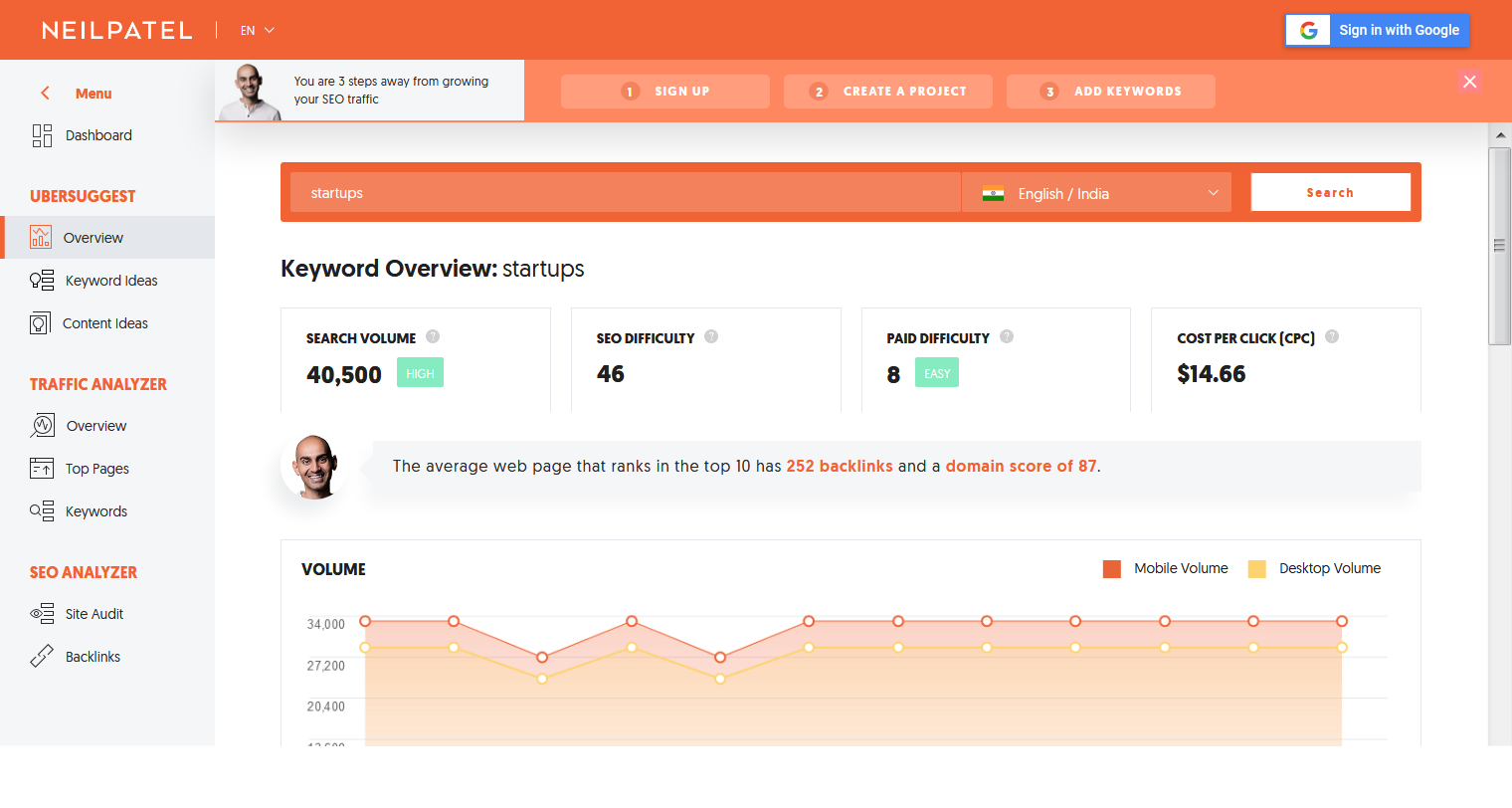
Despite being a free tool, Ubsuggest is a very powerful SEO tool that gives you insights on your own website or your competitor’s website. The site is enabled with a lot of tools that let you find keywords, content ideas, backlinks, traffic, etc. Anyone can easily use Ubsuggest by just logging on the site even without signing up.
Originally founded as a tool that scraped Google Suggest terms, Ubersuggest was recently acquired by entrepreneur Neil Patel, who has since expanded the feature set significantly.
Ahref
Ahref is the most popular brand when it comes to a suite of SEO tools. It has all kinds of tools which a marketer needs. Also, the data Ahref provide is the most reliable and you can trust it to plan your campaign.
Pricing Plans of Ahref are:
| Plan | Price |
|— |— |—
| Lite | $99/month |
| Standard | $179/month |
| Advanced | $399/month |
| Agency | $999/month |
Trello was initially released on September 13, 2011, and then again the revised version for iOS was released on October 2, 2019. After that, it was released for Android on October 10, 2019. Trello is a tool that helps to manage projects and see what’s working, who is working on it, and what is in progress.
It takes a few minutes to set the board and all the online marketing strategies can be shared in one place. Also, the entire team can jump in after getting a quick invitation. Trello is one of the hard tools to beat when it comes to collaborating with all tasks and the team.
Pricing Plans of Trello are:
| Plan | Price |
|— |— |—
| Free | $0/month |
| Business Class | $12.50/user/month |
| Enterprise | $17.50/user/month for 250 users |
BuzzSumo
BuzzSumo Homepage
BuzzSumo is an online marketing tool that allows users to find popular content. The process of finding content from different social media sites will be tedious especially for the growing businesses. This is where BuzzSumo comes for rescue, it can gather information from various social media sites like Twitter, Facebook, Instagram, Google+, etc about the topics getting the most attention.
BuzzSumo can also filter content type, i.e, an infographic, interview, video, or guest post. BuzzSumo helps the content marketers to find the most popular posts which can be relative to the business. You can also analyze your competitors using BuzzSumo which can help you to know what your competitors are doing. Four subscription plans are starting from $99/month however with each plan you get a free trial. This is one of the most user rated marketing tools which makes it valuable and trustworthy to use.
Pricing plans of BuzzSumo are:
| Plan | Price |
|— |— |—
| Pro | $99/month |
| Plus | $179/month |
| Large | $299/month |
| Enterprise | $499+/month |
Hootsuite is a social media management system that was created by Ryan Home in 2008. It allows the user to schedule social media posts in advance that saves a lot of time. Hootsuite also gives you in-depth analytical data of your social media marketing strategy which helps to lead the sales team. The key feature of Hootsuite is that it listens to the audience, it tracks and identifies key terms or phrases of your expertise in other user’s posts. Also, it helps with the advantage of schedule posts in advance across different social media platforms.
Pricing Plans of Hootsuite are:
| Plan | Price |
|— |— |—
| Professional | Rs. 1260/month |
| Team | Rs. 6600/month |
| Business | Rs. 45000/month |
| Enterprise | Custom |
ClearVoice
ClearVoice Logo
A complete content marketing ecosystem app is ClearVoice. It is a combination of flexible and portable software with a built-in marketplace. It is an app that combines content creation, branding, publisher communities, etc. ClearVoice is a subscription-based content marketing platform and was founded in 2014 by Jay Swansson and Joe Griffen.
Through the collaborative software, ClearVoice will help you to combine all the marketing needs you have. ClearVoice is specially designed for content marketing but it can also be used as a project management software to manage your to-do task list.
Grammarly helps to get the grammar right in the articles which helps the content writers to take less time to check the grammar. Grammarly is a web-based software that uses artificial intelligence and natural language processing. It was released in July 2009 by Grammarly, Inc. which has its headquarters in San Francisco and has offices in Kyiv and New York City.
Grammarly also has a free browser extension version which is automatically capable of scanning and checking the content’s grammar, spellings through machine learning and deep learning algorithms. It is considered as one of the best tools to enhance articles. The products Grammarly offers are grammar checking, spell checking, and plagiarism detection services. It is a crucial tool for marketing as we all know that a good written and well-optimized article is the most essential part of a content marketing strategy.
What’s better than infographics to promote the brand? It’s interesting and keeps the attention of the users to the bay. It is also a great way of marketing. For the purpose, Piktochart is the best tool to use for. It is a web-based infographic application and allows users to create infographics without being too professional graphic designer. It has free as well as paid subscription plans. Piktochart has over 600 templates that one can edit and can also use the more advanced version by customizing it, according to their preferences.
Pricing Plans of Piktochart are:
| Plan | Price |
|— |— |—
| Free | $0/month |
| Pro | $24.17/month |
| Pro Team | $82.50/month |
Yoast is a very popular WordPress plug-in that works to help optimize the content for search engines. It helps to choose cornerstone content, focuses on keywords that can help in ranking, individual content URLs, etc.
The Yoast SEO is free for WordPress and the paid version has plans range based on the number of sites one needs to monitor. It is a great way to optimize the content for SEO of a website. Pricing for yoast is $89 for 1 website.
Buffer
Buffer logo
You may have already heard about this one. The Buffer is an application that will help you to manage your social media handles. You can schedule, analyze, reply, and do so many things in just one place. In the free version, you can handle 3 accounts at once. Also, you can schedule 10 posts at once in the free version and the features increase with the paid versions.
But the twist is, those 10 posts are not weekly or monthly. Once you scheduled 10 posts, you cannot add more to the list. But as soon as one of those 10 posts get posted, you can add more in the queue. I would suggest you go for a free version unless you are handling the whole company through social media only.
Pricing plans of Buffer are:
| Plan | Price |
|— |— |—
| Pro | $15/month |
| Premium | $65/month |
| Business | $99/month |
Want to know what people think of your product? Conduct a free survey on Typeform. Typeform is a freemium website. You can conduct surveys for free, but only 10 questions per survey and only 100 responses each. The numbers turn into unlimited in the premium plans. An online survey website conducts surveys on many websites and lets their users earn some points through them. Why they do it for free?
Maybe because they know it will definitely impress you and you will buy the premium version. Try this service out if you are on your initial stage of entrepreneurship. You can also go for other websites like Survey Monkey or ZOHO, etc.
This is the best and free marketing tool in the whole list. HARO stands for “Help A Reporter Out”. Although it is a service for reporters to get the best content from people themselves, it’s a great opportunity for entrepreneurs. The basic subscription is free. Once you subscribed, you will receive 3 emails a day. If you think you can answer any of the asked queries, then reach out to journalists.
Once they liked your answer, they will ask you about your company. It will definitely help you to go to the next level. In the paid versions there are, of course, many advantages like you can filter the topic, get extra time by getting alerts when their editorial team approves a media opportunity, etc. It worth giving a try, but try the free version first.
I think this is the most underrated yet second best and free marketing tool for entrepreneurs. Google Trends is the best tool to check what’s up with the world. You can check which is the most trending topic on the internet. This may help you to create your advertisement keeping in mind the trending topic. Or if you are a blogger, then you know how important this tool is. You just have to learn to use it. It will feel so boring and useless at first, but it is probably the most important marketing tool for every entrepreneur out there.
Canva
Canva logo
It is a simplified graphic-design tool website. Founded by Melanie Perkins in 2012, it uses a drag-and-drop format and provides access to photographs, vector images, graphics, and fonts. It can be used for both web and print media design and graphics. It uses a freemium model. For the basic features, you can opt for free versions and upgrade them for the advanced versions. It has three monthly pricing options depending on the use of it. The user can get a 23% discount if the user pays annually.
Hotjar is a marketing tool that reveals the online behavior and voice of the users. It works by combining both analysis and feedback tools and then gives the reason for how to improve the site’s experience and performance. It allows easy access to instant feedback from the users. It comes with a free trial. The basic version is free of cost. The plus version is $29 per month and the business starts at $89 per month.
Pricing Plans of Hotjar are:
| Plan | Price |
|— |— |—
| Personal | $0 to $29/month |
| Business | $89 to $989 /month |
| Agency | Custom |
Simply Measured
Simply Measured logo
Simply Measured is a social media analytics platform. It simplifies end-to-end analysis of all social network activities of its users, whether it’s paid, owned, or earned. It is used in small businesses, large corporations, and every company between them. Examples of companies that used it are Adidas, Microsoft, and Samsung. It provides companies with social media analytics to measure their social media performance, online campaigns, etc. It is supported by Windows, MAC, and Web-based.
Conclusion
We’ve listed the top marketing tools that can help any business to grow and enhance the brand experience. If you are using any other tool then let us know in the comment below.
Business communication has evolved over the years. Today, companies are replacing their conventional phone systems with modern communication technology known as Voice over Internet Protocol (VoIP). A VoIP (Voice over Internet Protocol) phone system is an internet-based telephony system that delivers voice calls, video calls, and multimedia using internet connectivity.
Unlike analog phone systems, VoIP phone systems do not require any dedicated phone hardware. It allows the user to call any landline, mobile or even computer-to-computer with an internet-connected laptop, PC, mobile or tablet. Being a cloud-based technology, VoIP has revolutionized the communication infrastructure across all business sectors. It easily integrates chats, syncs applications, and provides real-time call data and analytics; thus enhancing organizational productivity. In short, the emergence of VoIP has changed the name and face of business communication.
Top Telephony Service Providers
Here, we have covered some of the top telephony service providers that can help your business. So, let’s dive in.
AVOXI Genius
Telephony software, also known as Voice over Internet Protocol (VoIP) uses internet-enabled devices to make and receive phone calls. With AVOXI, your VoIP number setup is fast and easy. There are no setup fees or minimum contracts. Every VoIP number includes 20+ features at no additional cost. Get your virtual phone number today for as low as $4.49 per month.
Avoxi Genius
Avoxi Core Cloud PBX is a voice technology system that enables use of legacy systems while decreasing hardware investment and maintenance. The cloud-based system serves the following industries: energy, finance, hospitality, insurance, manufacturing, media and entertainment, nonprofit, retail and transportation. Multiple gateways can accommodate an increase in the number of phone lines as businesses grow. Customer features include a 24/7 support team and password protected access to a secure web where users can view all call detail records.
CloudTalk is a telephony system built for modern companies. CloudTalk simplifies the lives of your sales and customer support teams with 70+ advanced calling features. Improve communication with prospects thanks to the integration with your existing helpdesk, CRM and eCommerce systems as Helpscout, Pipedrive or Shopify.
Cloud Talk
CloudTalk is a fully featured Call Center Software designed to serve Agencies, SMEs. CloudTalk provides end-to-end solutions designed for Macintosh. This online Call Center system offers Queue Management, Predictive Dialer, Call Recording, Contact Management, VoIP at one place. Price: CloudTalk pricing starts at $15.00 per month, per user. There is not a free version of CloudTalk.
Aircall
Aircall is the cloud-based phone system of choice for modern brands of 3+ users. By seamlessly integrating with the most popular CRM and Helpdesk tools, they help sales and support teams communicate clearly and efficiently. Admins can instantly add numbers from 100+ countries, scale their teams according to seasonality, and gain deep insights through real time analytics. Accessible by desktop and mobile app, Aircall is trusted by over 3000 companies worldwide. Aircall is the modern phone solution for sales and support teams.
Aircall
It is very user friendly and easy to use and setup and integrate with other software, web apps and services when building and testing a UC – Unified Communications Contact Center or OmniChannel. Price: Essentials Plan – $30/user per month, billed annually and Professional Plan – $50/user per month, billed annually. Free Trial available.
Freshcaller
Freshcaller is a cloud PBX system that enables you to purchase local and toll-free phone numbers in 90+ countries. Engage in contextual conversations with your callers without any hardware nor maintenance costs. Freshcaller is the ideal call center and business phone system for startups and small teams. With Freshcaller businesses can choose to record all their phone conversations and allow supervisors access to live dashboards and even listen and speak to customers in real-time.
freshcaller
As a phone system designed for teams with little/no IT support, Freshcaller allows users to create a new account in minutes and configure rules, business hours, and routing processes that are executed in real-time. Freshcaller enables businesses to scale their usage effortlessly by adding agent licenses, purchasing additional numbers or phone credits, and changing their pricing plan at any time. Price: Freshcaller pricing starts at $19.00 per month, per user. There is a free version of Freshcaller available.
Give your business a professional boost with Jive Voice. A cloud-based, feature-rich business phone system, Jive helps thousands of organizations across all industries and sizes to streamline their communications and achieve greater success. Jive Hosted VoIP offers a wide array of features designed to replace legacy landline phones, including unlimited voicemail boxes, auto attendants, and local and long-distance phone numbers. Starting Price: $19.95/month/user (Free Trial available).
MyOperator
MyOperator is a cloud-based business phone system providing solutions like virtual phone numbers (toll free/non-tollfree), IVR, call management features like call tracking, call recording, live call transfer, callers’ database, virtual receptionist and more. It extends the reach of your business 24*7 and routes calls to the right departments for a faster point resolution. It doesn’t require any hardware or software installation. This thereby helps save installation and additional infrastructural costs required while scaling up.
MyOperator
Also, it allows you to work anywhere and anytime. All your phone calls, be it the ones you made, received or missed are tracked. This not only helps you upgrade your customers’ experience but also ensures that no prospect is lost. Facebook and SMS remarketing are the ways that MyOperator offers to help you reconnect with your callers and repeat purchase. Price: There are 3 plans available – Office IVR System (Rs. 2,300/month), Cloud Call Center – Desk (Rs. 5,000/month), and Cloud Call Center – Prime (Rs. 20,000/month).
Flowroute
Flowroute, the first software-centric carrier, provides communication services and technology for cloud-based platforms. By providing businesses with programmatic access to communications infrastructure services, Flowroute removes the complexity of introducing new communications solutions to the market.
Flowroute
The patented nationwide Flowroute HyperNetwork delivers leading carrier-quality calling and messaging services with unparalleled reliability, reach, and simplicity. Flowroute is a fully featured VOIP Software designed to serve Agencies, Startups. Flowroute provides end-to-end solutions designed for Web App. This online VOIP system offers SIP Trunking at one place. Price: Flowroute is a pay as you go SIP Trunking service. There is not a free version of Flowroute. Flowroute does not offer a free trial.
JustCall is a cloud-based phone system that allows businesses to collect phone numbers from 58 countries and make them appear as local digits to their clients. JustCall gives you the platform you need to manage your international customers in a unified location, communicate with them with a simple and straightforward solution.
JustCall
JustCall is a cloud phone system that integrates with your CRM or Helpdesk. Make, receive and log all your phone calls and texts directly from your CRM/Helpdesk dashboard. Using different call distribution settings, you will never miss a customer support call ever. Give easy ways to your customers to reach relevant departments, allow them to remain in queue while waiting for an agent to come on the call or even give them an option to leave voicemails. Apart from basic contact center software solution, JustCall also provides other useful tools like Bulk SMS Campaigns, SMS Bots, Auto Dialer, Predictive Dialer, Dynamic Number Insertion etc. Price: There are two plans – Standard ($25/user/month) and Premium ($50/user/month).
Conclusion
Telephony Software includes many telecommunication features, from recording calls to creating a complete call center environment. Selecting the best software depends on your needs but the above list can serve as a reference. The software works as a fully featured telephone switch connecting to phone lines and extensions using state-of-the-art virtual PBX and VoIP technology. If you know about any other tool, please let us know in the comments section below.
Document management (DM) software encompasses a wide range of features and functionalities, many of which are critical to effectively running a business. Many small to midsize businesses (SMBs), such as legal firms, creative firms, or media and publishing organizations, aim to go paperless and are looking for the right tool to do so. Businesses generate a lot of data regardless, so choosing a reliable and scalable DM system is key to streamlining and automating workflows.
For SaaS companies, an efficient DM system can make better overall performance for several reasons. The most basic reason is having a place to store and organize documents. Version control, workflows, access permissions, backup, and data protection can also be handled by a DM solution. It is the starting point for storing, securing, and sharing various business documents. The ability to classify data is another DM capability that can completely change the way your organization maps its workflows.
Top Document Management Software
Here, you’ll get to know below the 10 best document management systems that can help you go digital, automated, and paperless.
Confluence
Confluence is an open and shared workspace that connects people to the ideas and information they need to build momentum and do their best work. Unlike document and file-sharing tools, Confluence is open and collaborative, helping you create, manage, and collaborate on anything from product launch plans to marketing campaigns. Today all kinds of functional departments of any size use Confluence, from technical teams and project management groups, to marketing, HR, legal, and finance. All teams get work done with Confluence.
Confluence
With Confluence you have an environment that is very efficient to work in to add new content, very easy to update articles and manage file attachments. Setting up spaces for various audiences, including a “personal space” allows you to draft documents privately and then move the document over into a space with an audience. The permission scheme is based on spaces, individuals and groups, with flexibility from super-locked-down to wide open on the public internet.
Price: Confluence pricing starts at $10.00 per month, per user. Confluence does offer a free trial.
Templafy is one of the best document management tools out there. The system aims to integrate essential office suites and solutions used by businesses on a daily basis. If there’s one thing that can be frustrating, it’s having to create brand documents using different software. This can become time-consuming and fragmented, but Templafy can help. With it, you can create a range of files within the system and manage them from a single feed.
The software is compatible with a range of devices and uses the cloud to let you access all your documents across computers, tablets and smartphones. There are also automatic compliance checks, and you can give feedback to employees easily, too.
Price: Contact is required for a pricing quote, and not surprisingly, the exact cost depends on the number of users, features and add-ons chosen.
PandaDoc
PandaDoc is a leading online document management platform that lets you create, deliver, and share documents online. It allows for legally binding e-signatures and supports various document formats like PDFs, Docs, and other preexisting digital documents for faster paperless transactions and processes. The software works well with quotes, contracts, agreements, and other sales collateral, and is ideal for use by your HR, sales, marketing, finance, legal, and operations departments. For that matter, any business or organization can reap the benefits of document management software like PandaDoc in terms of document building, sharing, and delivery.
PandaDoc
The software is an all-around document management platform that enables you to sign documents anywhere at any time with the built-in e-signature function. It comes with a robust but easy to use document creator with drag and drop editor, allowing you to quickly come up with all kinds of business documents such as proposals, business plans, contracts, and quotes, among others.
NetDocuments
NetDocuments has been the leader in cloud-based document management since 1999, helping firms to reduce costs and increase productivity with enterprise search, built-in disaster recovery, client, matter, and project-centric workspaces, and any time access on a modern platform that scales to both small and large firms alike.
NetDocuments
It’s powerful, cloud-based document management system helps your firm effectively store, create and categorize your documents and email. Collaboration tools allow you to easily share individual documents or even entire folders securely with your clients and experts. NetDocuments has made big strides in reliability and customer focus and these areas need to continue to be developed as they were not strong suits in years past.
Dropbox Business is a central workspace that helps teams stay organized and keep their work flowing. All your team’s content is in one place, making it easy to collaborate and focus on the work that matters. Dropbox Business is trusted by over 300,000 business teams worldwide and over 50% of the Fortune 500 for its industry leading file sync, collaboration, and extensive administration and security features that scale as teams grow. Companies of all sizes use Dropbox Business for collaboration, file sharing, online backup, and more.
Dropbox Business
Dropbox is a great program to integrate with other programs such as Adobe PDF. It is incredibly easy to save all of your sales proposals straight onto the dropbox app from your iPad Adobe PDF app which saves you time and energy. My number one favorite feature in Dropbox is the ability to share a link to a file with clients and have them make comments right on the file.
If you’re sharing a video, they can comment at exact spots in the video, and they can markup graphic files. Additionally, Dropbox saves you an incredible amount of time in the office, as you no longer have to request files from various members of your design team. With your shared Dropbox folders, everyone can access everything, and with version control, nothing is ever lost.
M-Files
M-Files is an intelligent platform designed to help businesses manage, organize, and track documents and information. It can be used by both small and large companies in a variety of industries. This wide applicability is made possible by a host of features that are bound to benefit any organization such as mobile optimization, version control, e-signature support, document templates, offline access, permission control, and automated workflows. It is equipped with a search engine for finding documents based on document type, names, and keywords, among others. It even lets you search inside the text of documents.
M-Files
The solution offers workflow automation capabilities and notifies you whenever document changes need review or approval. Likewise, you can send invites and edit documents simultaneously with its co-authoring feature. M-Files also offers enterprise-grade information management functionality, allowing you to securely share information with stakeholders or team members. The software integrates with leading CRM and office solutions and is available through quote-based pricing.
Docuware
Docuware takes a cloud-based approach to document management. It integrates cloud storage and office automation to create a digital workplace. This paperless approach to the full spectrum of office tasks is another example of the digital transformation which is driving many processes these days.
Docuware
Docuware offers services to create a ‘cloud workflow’ when it comes to documents. It allows services to be purchased on a small scale as needed, and then as use-case scenarios are created, and reliability is ensured, the service can be scaled up for a larger deployment. Mobile apps that can integrate into this workflow are also offered, facilitating the likes of scanning receipts on the go, approving invoices for speedy payment, and signing forms directly on the device.
Box works in any browser and allows you to easily store and manage all your content online. It also lets you share files instantly and access documents from anywhere. No matter what device you choose, get fast, easy access to documents, project plans, presentations and videos. Always have the latest pitch for your customers, on or offline. Box makes it easy for administrators to maintain a central view of all content and users in their account through a powerful admin console.
Box
There are many things to love about Box. For one, its Business plans come with unlimited storage! It’s worth the price especially for small to medium-sized businesses looking for a secure place for storage with tons of extra features for both admin and security. The 5GB upload is enough for the big multimedia and other iso/archive files. For your admin, the integration with your Active Directory saves you from having to require your users to create/maintain an extra account (user/password) for Box. The corporate logo can also be incorporated into the platform to make it personalized according to your company’s branding scheme. Box also offers a ton of possible integrations eg Google Suite (e.g., docs), Salesforce (CRM), and MS Office 365. This makes it easy for users to create content as your usual platforms and then easily save and manage them in Box.
Price: Box pricing starts at $5.00 per month, per user. There is a free version of Box and Box does offer a free trial.
Zoho Forms
Zoho Forms is an online form builder perfect for all business sizes. It helps you create and manage online forms by using a variety of field types and customizable themes. You can start from scratch or choose from the many templates available. The form creator tools, which include an automated calculation field, are also handy in personalizing payment forms. Plus, you can connect your forms to secure payment solutions like Paypal, 2Checkout, and more.
Zoho forms
The application also supports multi-page forms. By simply adding a page break, you can add and rearrange pages in your forms as needed. Page rules can also be modified to help your respondents navigate to specific pages based on their answers. Moreover, you can use email campaigns, QR codes, and links to share your forms on social media, or you can embed the forms on your website.
Samepage
Samepage is an award-winning project collaboration software that brings you collaborative tools, communications solutions, and document management capabilities in one cloud-hosted platform. It’s all about productivity, which Samepage lets you achieve through features and capabilities that include team chat, video conferencing, task management, file sharing, real-time document collaboration, and more. The software is designed to help teams of all sizes manage projects and get more done in a single easy-to-use workspace.
Samepage
This comprehensive collaboration solution for business teams gives you functionalities such as scheduling, discussion topics, meeting agendas, files, instant messages, conversations, and task lists. It is ideal for companies and organizations such as educational and non-profit organizations, marketing firms, and real estate agencies. It can be implemented across teams of employees, vendors, partners, consultants, and customers and lets you compile files, images, videos, conversations, and maps, allowing you to maximize the advantages of a collaboration platform.
Conclusion
Document management software automates the process of creating, uploading, storing, tracking, and archiving files. It helps users share documents, track comments and changes, and store documents in a centralized repository. To sum up, there’s a wide variety of document management systems that you can choose from. So, you shouldn’t worry about not finding a good option for your operations. Above softwares includes both standalone systems, and broader software suites that offer core document management functionality in addition to other features. You can choose a software that caters to your needs. If you know about some other document management software, please let us know in the comments section below.
Software as a Service (SaaS) is a high engagement affair with its users. Modern businesses face crucial challenges related to customer retention and business development. Due to a shift in focus from primarily sales-driven organizations to more service-driven systems, businesses are trying to improve revenues by engaging customers in better ways. With the rise in popularity of communication services such as Facebook Messenger, LiveChat, Whatsapp, and others, it has changed the way consumers interact, both in their personal and professional lives.
Chatbot
Research shows that customers become angry when businesses do not satisfy or provide proper customer support. By improving customer support functions, businesses can build brand loyalty and boost revenue in a short time.
In short, a chatbot is a computer program which mimics conversation between users, usually powered by artificial intelligence. A user could ask the chatbot a question or provide it with an instruction and the chatbot will respond. Chatbots are the new-age tool for helping businesses improve customer satisfaction, thereby, improving sales. They’re typically considered either an informational bot or a utility bot; a utility bot is generally one that takes instructions such as scheduling an appointment, and an informational bot is one which is pretty self-explanatory – it provides the user with information, usually about the website they’re on.
How Chatbot Works?
Why use chatbots?
Chatbots are becoming an effective tool for lead capturing and are being integrated into websites to help businesses get prospects in efficient and cost-effective ways. They are more than simply a traditional live chat. They have assisted the startup world with scaling operations, building customer bases and boosting revenues. Users tend to favour an interactive medium for making their online purchases, and ultimately users want their information as quickly as possible. Chatbots allow your user to get their answer straight away, and if the bot is integrated with an app such as Facebook Messenger, there’s no need for them to download an additional app or keep changing between screens.
Use cases for chatbot
A chatbots’ ability to understand and respond to customers’ questions make them a popular and powerful application. Chatbots help companies by offering better customer engagement. In turn, this drives companies to grow stronger globally through their outreach. Benefits also include saving time and money as well as optimally use human resources. SaaS businesses would not exist without the invention of the internet. Over the last 30 years, though, the playing field has been levelled. It is time for SaaS platforms to find a new differentiator, not only against other businesses but also against other SaaS. Chatbots are the perfect tool to bring that differentiation.
Here are six ways chatbots can positively impact your SaaS business.
They’re fast
One of the biggest things that chatbots bring to the table is their ability to take a huge burden off customer support. Unlike executives who cannot handle more than 3 or 4 customers at a time in real-time conversations, chatbots can tackle many customers at once. Conventional CRM forces customers to wait to have their grievances addressed. In addition to the problems they’re facing, the long wait adds to a customer’s anxiety. By dropping a (knowledgeable) chatbot on your website or within your platform, you instantly give your audience what they want: help, now.
Lead Filtering and Identification
If you run an ecommerce business or a sales website, you may be receiving significant traffic due to promotional expenditure, but does it convert into tangible sales? The answer is, highly unlikely. Even a sales funnel will only work if the user follows through with the content. However, when you position a Chatbot, it prompts the user when looking for something specific. You feed the Chatbot with keywords and once the user responds, the Chatbot connects them with an actual salesperson. You may be unsure about retaining a 24/7 sales representative because you don’t want to waste resources on casual ‘digital dwellers’ who have no intention to purchase. This is where the Chatbot can help you identify the lead at the right time, putting your sales team into action just when you need them.
Benefits of Chatbot
They’re Smart and Quick
Customers prefer quick and immediate responses as opposed to slow and tedious email threads. The fact that customers can get quick responses gives credence to chatbots. Chatbots are a better alternative to both Interactive Voice Response mechanism and email resolution methods. Chatbots are trained to respond with relevant and precise answers in an instant.
Information Gathering and Recording
Data shows that people talk more freely when they know who they are interacting with, whether it be with Apple’s Siri, Microsoft’s Cortana, Google’s Home or Amazon’s Echo. This same principle applies to Chatbots. When posting casual comments, most users can provide vital information showing their importance to your business. The data voluntarily provided by consumers regarding recent purchases, hobbies, likenesses and residential areas can be leveraged by the sales team to reach out to specific buyers. While human sales personnel may miss these red flags, a pre-programmed Chatbot will not.
Finally, being a first mover. The first mover advantage, which gives the upper hand to the first company to adopt a new piece of technology, doesn’t last. Chatbots are super early. There aren’t that many SaaS companies leveraging them just yet. You can still be a first mover. You probably have a couple of years tops, though, so you might have to act fast. Being a first mover has several advantages beyond just ‘being first’ and grabbing all the money. Namely, being a first mover offers a branding advantage. Position your company as an innovator in your field and reap the beautiful branding rewards.
A Happy Customer Stays
Customers whose problems are solved are more likely to stay loyal to the company, instead of migrating to the competitor. In fact, customers will be receptive to receive information about new offers and products. Developers are training chatbots to interact with customers like a friend. This informality is likely to create a shift from conventional marketing techniques towards revolutionary methods. These are times where going ‘mobile and digital first’ is the order of the day. Companies use chatbots during aggressive marketing campaigns to out maneuver their competition.
AI and chatbots
Chatbots can do much more than just customer service, the list of use cases grows every day. Besides basic script-based customer support, chatbots using NLP and machine learning are being used across industries to enable support in different functions. For example –
Chatbots can provide virtual assistance – One can reserve events, doctor appointments, restaurant reservations, movie tickets and more. E-commerce chatbots help in ordering food and just about anything from websites. Chatbots can help manage a person’s health, grocery etc.
Chatbots can help in content delivery for news updates and sports content. Some chatbots exist to give basic diagnosis advice based on symptoms. The bot can then refer users to a live doctor for further consulting.
Additionally, Chatbots are used in real estate to identify and convert leads. The chatbot field is diverse and rapidly growing and has since surpassed the realm of customer service.
Conclusion
Organizations all over the globe are trying to come up with new initiatives to make their workplaces more productive. Chatbots can help here too. Automation can create a lot of free time to enhance efficiency or allow people to devote that time for creative work. Chatbots are here to stay and are growing in intelligence to support different functions in multiple industries. It is essential that organizations understand chatbots and their usage at the primary level. There is little doubt that the number of complex tasks that will be handled by chatbots will also grow exponentially in the future. What do you think about the use of Chatbot in SaaS industry? Please let us know in the comments section.


 Souvik Dey


 Niku Mandal